
Table of Contents
Q.1. Define Information. Discuss the properties and characteristics of information. (20)
Information is data that has been processed in such a way as to be meaningful to the person who receives it. it is any thing that is communicated.
Information is data that has been converted into a more useful or intelligible form. It is the set of data that has been organized for direct utilization of mankind, as information helps human beings in their decision making process.
Examples are: Time Table, Merit List, Report card, Headed tables, printed documents, pay slips, receipts, reports etc.
The information is obtained by assembling items of data into a meaningful form.
For example, marks obtained by students and their roll numbers form data, the report card/sheet is the information.
Other forms of information are pay-slips, schedules, reports, worksheet, bar charts, invoices and account returns etc. It may be noted that information may further be processed and/or manipulated to form knowledge.
Information containing wisdom is known as knowledge.
Properties of Information
Information can be examined from the point of view of its inherent properties. Here with reference to those that apply to:
a. Information in General,
b. Scientific and Technical Information, and
c. Information pertaining to Technology and Economics.
1. General
• Information is not consumed in its use.
• It can be shared by many and can be used simultaneously without any loss to anyone.
• It is the most democratic resource in that it can be consumed by poor and rich alike depending upon the intake capability.
• Knowledge is dynamic, ever growing and continuing and no final word is said or will ever be said on any aspect of it.
2. Scientific and Technical Information
• Universal, particularly in the Physical, Chemical, and Biological Sciences.
• Open and available to all who seek them, through a well organised operating communication system.
• A system of peer review and mode of communication operates in its dissemination.
• Peer group review ensures quality to a large measures.
• Healthy competition results on account of peer review and speedy communication.
• Becomes obsolete in fast developing disciplines and obsolescence factor is quite in some of them.
• Exponential growth in scientific publications has been causing concern in accessibility and availability.
3. Technological and Economic Information
• Restricted because of time and geographical space bound.
• Competitive because of business interests, sometimes for reasons of security of nations.
• Secretive because of competition and reasons of security.
Over the years knowledge and information have become powerful weapons for political and economic superiority among nations. The generation of knowledge and its applications for various purposes have been given the highest priority in the recent decades, particularly among the western industrialised societies. The developing countries naturally suffer from a number of constraints in the acquisition, storage processing, disseminating and making them available for use.
Characteristics of Information
1. Availability/accessibility
Information should be easy to obtain or access. Information kept in a book of some kind is only available and easy to access if you have the book to hand.
A good example of availability is a telephone directory, as every home has one for its local area.
2. Accuracy
Information needs to be accurate enough for the use to which it is going to be put. To obtain information that is 100% accurate is usually unrealistic as it is likely to be too expensive to produce on time.
3. Reliability or objectivity
Reliability deals with the truth of information or the objectivity with which it is presented. We can only really use information confidently if we are sure of its reliability and objectivity.
4. Relevance/appropriateness
Information should be relevant to the purpose for which it is required. It must be suitable.
For example, a market research company may give information on users’ perceptions of the quality of a product. This is not relevant for the manager who wants to know opinions on relative prices of the product and its rivals. The information gained would not be relevant to the purpose.
5. Completeness
Information should contain all the details required by the user. Otherwise, it may not be useful as the basis for making a decision.
For example, if an organisation is supplied with information regarding the costs of supplying a fleet of cars for the sales force, and servicing and maintenance costs are not included, then a costing based on the information supplied will be considerably underestimated.
6. Level of detail/conciseness
Information should be in a form that is short enough to allow for its examination and use. There should be no extraneous information.
For example, it is very common practice to summarise financial data and present this information, both in the form of figures and by using a chart or graph.
7. Presentation
The presentation of information is important to the user. Information can be more easily assimilated if it is aesthetically pleasing.
For example, a marketing report that includes graphs of statistics will be more concise as well as more aesthetically pleasing to the users within the organisation.
8. Timing
Information must be on time for the purpose for which it is required. Information received too late will be irrelevant.
For example, if you receive a brochure from a theatre and notice there was a concert by your favourite band yesterday, then the information is too late to be of use.
9. Value of information
The relative importance of information for decision-making can increase or decrease its value to an organisation.
For example, an organisation requires information on a competitor’s performance that is critical to their own decision on whether to invest in new machinery for their factory. The value of this information would be high.
10. Cost of information
Information should be available within set cost levels that may vary dependent on situation. If costs are too high to obtain information an organisation may decide to seek slightly less comprehensive information elsewhere.
For example, an organisation wants to commission a market survey on a new product. The survey could cost more than the forecast initial profit from the product. In that situation, the organisation would probably decide that a less costly source of information should be used, even if it may give inferior information.
Q.2. Explain with the help of suitable examples the advantages of computerization in hospitality industry. (20)
The advantages associated with computer-based managerial decision-making can be the following :
1. Response time is greatly reduced
2. Very large data are stored for information and decision-making
3. Accuracy of information is considerably improved, thereby improving the quality of the decision
4. Problems are handled more easily by using various operation research models
5. The cost involved in the decision-making process is reduced
6. More secrecy is observed as compared to manual file system
7. Ability to take quick decision improves considerably as the time for retrieval of information is very fast
8. Paper work is reduced to the minimum as all the information is stored in the computer itself
9. Lots of information are stored for future reference
10. Chances of leakage of classified information are reduced
11. Accuracy in manipulation is increased very much
12. Time spent in various decision-making activities is reduced to a minimum.
Emanating from the above, the following benefits for a hotels organisation can be attributed to computerisation :
1. The availability of accurate forecasts within 1 per cent of net income
2. The preparation of short-term profit plans and long-term projections
3. The provision of pre-plan information in budget preparation
4. The calculation of variances between budgeted and actual results
5. The triggering of revised forecasts if not proceeding in accordance with plans
6. The early warning system for monitoring activities and the signalling of necessary reactive plans
7. The indication of income and cash flow by following alternate investment strategies
8. The assistance to the planning of new facilities and a host of special strides
9. The accomplishment of the preceding items at a great speed.
Eg – The effect of computerisation on an airlines. The computerisation of the Ticketing Section has resulted in an easy ticketing procedure and also helps the ticketing agents of the airlines who can get the system on their computers.
Moreover, now a days the customer care cargo, marketing departments and others are also computerised. This makes the customer needs easy to handle.
Similarly most of the travel agencies have linked themselves to Computerised Reservation Systems of hotels, airlines, car rentals, etc. This not only saves time and energy, but also helps them in providing better services and instant bookings to the customers.
Q.3. What do you understand by computer hardware? What comprises computer hardware? (20)
Hardware is the collection of physical parts of a Computer system that has shape and size and can be feel.
The most essential hardware components are
• Motherboard,
• CPU,
• RAM memory,
• IO system,
• Power supply,
• Video display controller,
• Bus and
• Hard disk drive.
Inside the CPU box there is hard disk, motherboard, and RAM, video card, CPU Fan, sound card, server components, CD/DVD drive and many more.
The hardware components does change in shape and size as in a desktop computer the CPU integrates all the components that are connected by wires but in laptop computers the components are integrated into a single portable unit. Basically the hardware components in a Computer system are connected through wires in order to function properly. From power supply to network connection all are connected through wires.
Hardware Components
The most important hardware component is Mother Board that holds all the important components of a Computer including CPU, memory and various connectors for input/output device.
Some of the input devices are
• Keyboard,
• Mouse,
• Microphone,
• Modem,
• Joystick,
• USB devices,
• Joystick
Similarly the output devices are-
• Computer monitor,
• Modem,
• Projectors,
• Printers etc
The main mother board that includes graphic processors for better display screen on your monitor.
There is CPU socket, CPU fan memory connector, super IO chip, DIMM memory slots, IDE connector, SATA connector, BIOS flash chip that are the most essential components to run a Computer system. It also integrates audio codec chip for sound and gigabit Ethernet chip for network connection on a computer.
There are several hardware components attached to the CPU or Central Processing Unit which is also called as the brain of Computer.
The CPU includes all the processors that interprets and execute program instructions. It includes control unit that instructs, maintains and also control the flow of information, arithmetic logic unit for simple logic operations and a controller.
Inside the CPU, memory is an important component that stores all the information or data on your computer. It includes the main memory slot called RAM (Random Access Memory), ROM (Read only Memory), CMOS battery, internal hard disk that is connected to Computer system to store abundant data and applications, and an optical disk drive known as CD/DVD drive that can read and write from CD or DVD’s. There are also points for external storage devices like USB, flash drive, external hard disk to be connected for memory storage.
The hardware components are connected to the bus through a controller that coordinates the activities of a device with the bus. Bus is a term given to a group of wires on the main circuit board of Computer that connects all the components including network, hard disk, USB drive, keyboard through a controller, main memory and processor directly to bus and display monitor via video card. It allows the flow of data between the components and also within the computer to another computer.
There are also other types of hardware components like a CD ROM drive, Floppy disk and Zip drive. Floppy drive is a data storage device which was used to run a floppy disk and is not used now anymore due to very slow and virus infected. CD ROM drive is known as compact disk read only memory which used to store data, software, games, songs etc. Zip drive is a removable medium capacity storage device which was used earlier.
With the changing world and new technology there are lots of powerful hardware components designed for better performance of PC. There are several manufacturing companies making tons and tons of hardware components and one of the most popular is Intel that mainly designs processors, motherboard, graphic chips, flash memory, network interface controllers and many more.
Hardwares are available in different models and types that are designed mainly for a particular computer PC. One thing you must remember that any hardware is useless if there is no software, so a Computer must have software to run a hardware component.
Q.4. Define Local Area Network (LAN). Explain the characteristics and structures of LAN. (20)
A local area network (LAN) is a computer network that interconnects computers within a limited area such as a residence, school, laboratory, university campus or office building. By contrast, a wide area network (WAN) not only covers a larger geographic distance, but also generally involves leased telecommunication circuits.
Ethernet and Wi-Fi are the two most common technologies in use for local area networks. Historical network technologies include ARCNET, Token ring, and AppleTalk.
In a wireless LAN, users have unrestricted movement within the coverage area. Wireless networks have become popular in residences and small businesses, because of their ease of installation. Most wireless LANs use Wi-Fi as it is built into smartphones, tablet computers and laptops. Guests are often offered Internet access via a hotspot service.
Most LANs connect workstations and personal computers. Each node (individual computer) in a LAN has its own CPU with which it executes programs, but it also is able to access data and devices anywhere on the LAN. This means that many users can share expensive devices, such as laser printers, as well as data. Users can also use the LAN to communicate with each other, by sending email or engaging in chat sessions.
LANs are capable of transmitting data at very fast rates, much faster than data can be transmitted over a telephone line; but the distances are limited and there is also a limit on the number of computers that can be attached to a single LAN.
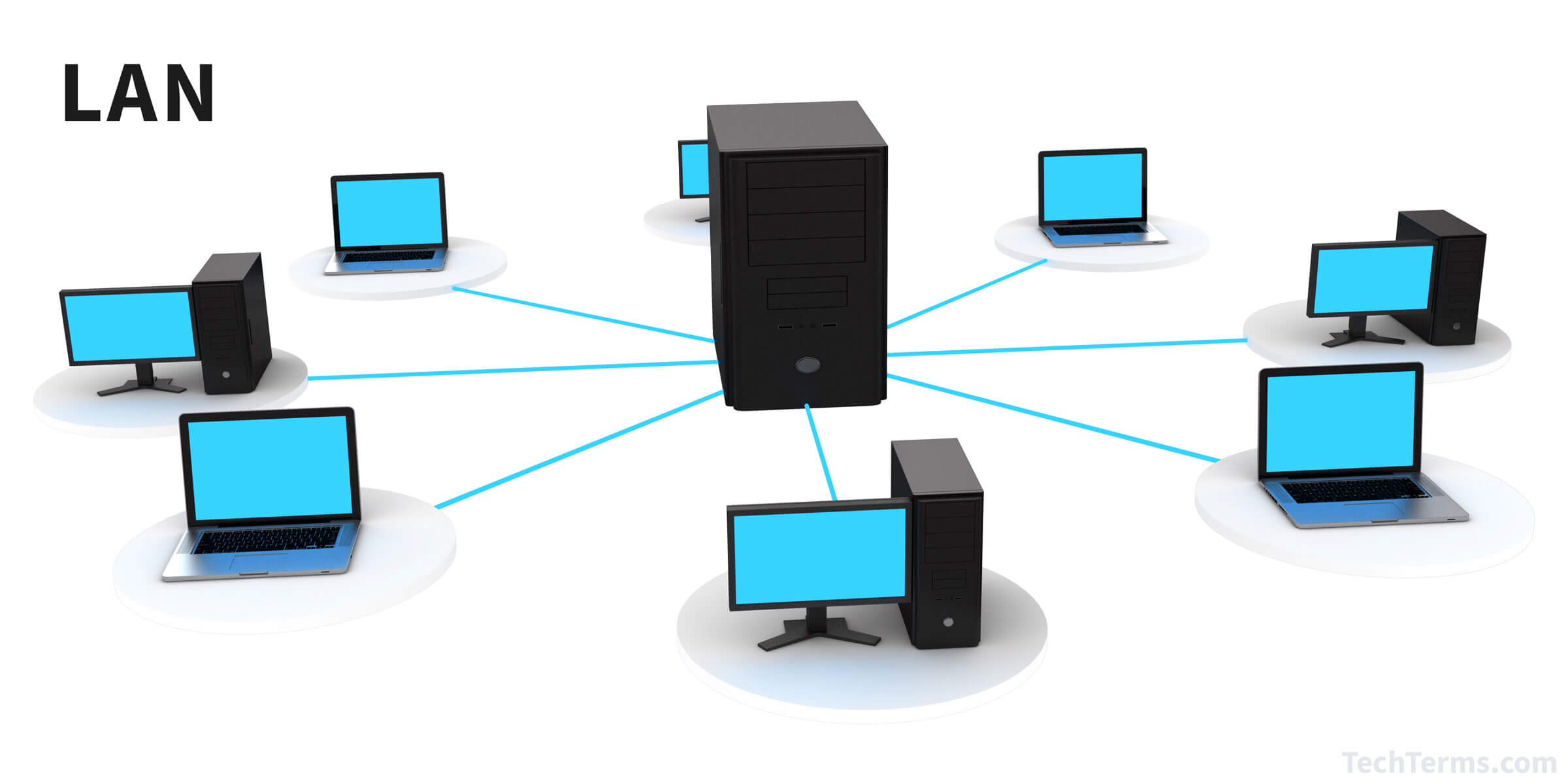
Characteristics of LAN
Here are important characteristics of a LAN network:
• It is a private network, so an outside regulatory body never controls it.
• LAN operates at a relatively higher speed compared to other WAN systems.
• There are various kinds of media access control methods like token ring and Ethernet.
• Coverage area is generally a few kilometres.
• Using different dedicated transmission medium you can achieve the transmission rate of 1 Mb/s to 100 Mbit / sec or higher, with the further development of LAN technology is currently being developed toward higher speed (e.g. 155Mbps, 655Mbps and 1000Mbps etc.).
• In LAN you can run the multiple devices to share a transmission medium.
• You can use the different topology mainly bus and ring in LAN.
• The communication quality is better IN LAN, the transmission error rate are low as compare to WAN.
• LAN support a variety of communications transmission medium such as a Ethernet cable (thin cable, thick cable, and twisted pair), fiber and wireless transmission.
• A LAN usually has low cost, installation, expansion and maintenance and LAN installation is relatively simple, good scalability.
Advantages of LAN
Here are pros/benefits of using LAN:
• Computer resources like hard-disks, DVD-ROM, and printers can share local area networks. This significantly reduces the cost of hardware purchases.
• We can use the same software over the network instead of purchasing the licensed software for each client in the network.
• Data of all network users can be stored on a single hard disk of the server computer.
• We can easily transfer data and messages over networked computers.
• It will be easy to manage data at only one place, which makes data more secure.
• Local Area Network offers the facility to share a single internet connection among all the LAN users.
Q.5. Write short notes on any two of the following: (2×10=20)
a. Scope of Data
Scope of the data can be studied from the following points of view:
1. Utility of Data
Data have great utility as their use in the growth of knowledge. No research, investigation, experiment, etc. is possible without reference to data already existing. Nor does any research end without generating new data. No decision making system can work, nor can a problem be solved, without adequate use of data. No planning is conceivable without enough data. For want of sufficient data research results or conclusion drawn from an enquiry are automatically rendered untenable.
Data also alters concepts and removes uncertainty. Data, then, are indispensable in research and in planning and decision making. Data is equally important in tourism so as to understand the emerging trends of tourist flow, tourism planning and strategic planning by tourism organisation to carry on their business. It is also used for future projections.
2. Size of Data
Size of the data involves the converge of the subject under study, data elements, and data population covering documents, data banks, and field survey methods (questionnaire, interview, observations, etc.). In Science what already exists is in the form of data. According to an Aslib statement, scientific data include:
• the properties and attributes of an individual entity,
• the values of one property over many entities,
• variations of one property of one entity under different conditions,
• classification of entities based on properties, and
• quantitative relations between two or more entities.
There are equations and formulate, properties and values, actions and reactions and conditions and variations. All these, when stated, form data. There also exist numerous data banks, e.g., Chemical Formulary and British Pharmacopoeia. The scope of data in Science is, thus, very vast.
All governments are involved in socio-economic upliftment. Most applied research all over the world, therefore, is being conducted now-a-days at the behest of the state. Every government has established its own data system for collecting and organising data in their respective fields, e.g., Indian Meteorological Department, Survey of India, Indian Statistical Organisation, National Sample Survey, Census of India, Tourism Statistics and several others. Governments cannot frame policies and formulate plans unless large amounts of data are available as a basis. This explains the establishment of National Informatics Centre.
3. Period of Data
Data collection for any research problem must indicate the time span. It should be clearly stated whether data period is current or cumulative. In Science the interpretations and conclusions are mainly drawn keeping in view the whole text of the subject. In Social Science and Humanities, however, the cumulative period is not taken into account for data collection.
Tourism department also uses a vast amount of data to keep track of changes and emerging trends. The Foreign Exchange is also calculated from data. It is seen that there exists no field of knowledge, no human activity where data can be dispensable. All investigations begin and end with data. In intellectual pursuits data are all pervasive, only their nature varies with the event.
b. System Life Cycle
The various stages in the System life cycle of a CBIS are –
1. Objectives and Feasibility
The first and the most important step is to provide a broad statement of organisational objectives, for the proposed CBIS. This is primarily a responsibility of the top management, since this Information System is expected to help the organisation and the management in the discharge of their function. The Information Systems development effort begins by understanding the organisations objectives, for these are required to be translated to constitute the objectives of the Information System.
The next step is to examine the feasibility of the proposed system. This involves considering various broad alternatives, such as, valuating the costs and benefits of the system. Initially a rough cost-benefit analysis will be sufficient for the top management to take a decision either in favour of or against the proposed CBIS.
2. System Analysis
Systems Analysis is the next stage in the life cycle of a CBIS. The system analysis includes review of the existing procedures and information flow. Decision-making and individual information needs at various levels in different functional areas are also reviewed. The system analysis phase primarily focuses on isolation of deficiencies from the existing system.
The fundamental activities involved in the system analysis are:
• Definition of the overall system,
• Separation of the system into smaller and manageable parts, and
• Understanding the nature, functions and interrelationships of various subsystems.
Systems Analysis involves teamwork and a considerable amount of time. A clearer picture of costs and benefits of alternative approaches will emerge from a detailed study of the proposed system. Involvement of ultimate users of CBIS is very crucial at this stage itself, so that the acceptance of CBIS upon implementation will be relatively easy.
3. System Design (Logical)
The Logical System Design phase defines the way things should be for the same problem. The system development phase includes mapping of the business requirements of the managers on to the proposed system. The conceptual design for the model which has been developed in the problem definition stage is enlarged to understand the actual flow of data and the logical model is developed. The logical model is worked out to finally develop and test the physical system in the system development phase.
A logical representation of data flow analysis and data processing analysis in a CBIS can be effectively provided through structured system design tools. These are:
a. Data Flow Diagram
A Data Flow Diagram (DFD) is a graphical representation to depict the flow of data in a CBIS. It should be realised that a DFD provides only a logical data flow and not a physical data flow.
b. Data Dictionary for Data Flow Analysis
A Data Dictionary (DD) is intended to provide a complete documentation of all the elements of a Data Flow Diagram, namely data items, data stores, and data flows.
c. Decision Tables
A decision table displays and documents clearly the processing logic for each processing step identified in a DFD.
d. Decision Trees
A decision tree is another way to document processing logic, specially when the number of alternatives is not too many. Combination of conditions are represented along the branches of a decision tree. The outcome of each of these combinations is given at the end of the final branch.
4. System Design (Physical)
While a logical design provides an estimate of processing requirements, a physical design involves mapping the logical design onto the physical hardware of a computer system. Upgrading the existing hardware and/or acquiring a new computer system if required to meet the processing requirements is also undertaken at this stage.
The system analysts assign specific responsibilities to the programmers who develop and test the programmes.
5. Implementation
Once the system has been declared fully developed and tested by the development team, it is ready for implementation. Actual programming is undertaken at this stage to implement the proposed CBIS in the available hardware. The involvement of the user is necessary throughout the project duration, but the user involvement is critical during this phase.
The implementation includes the following activities:
• Programme development and planning for implementation,
• Preparing the schedule for implementation,
• Procurement of hardware,
• Installation of software,
• Operation and testing of software on hardware,
6. Maintenance
Though the system is thoroughly tested before the implementation, yet the system is never fool proof and errors always continue to exist. Therefore, there is a need to have a systems person to look after the system and maintain it even during the operation and production.
As users develop faith in a CBIS, their demands on the system will grow. The system design should be flexible enough to accommodate future requests, refinements, modifications, and changes to suit users’ requirements. Well documented logical and physical designs of a CBIS will facilitate its maintenance considerably.
c. Operating Elements of Information System
Any information system will make use of the following physical components:
a. Hardware
The equipment and devices for inputting, outputting, secondary storage, processing as well as communications in the system.
b. Software
The set of programmes to facilitate processing procedures; it includes systems software, applications software and the model base.
c. Data Base
The organisational data to be used by various software programmes is usually stored in the form of files and database on the physical storage media such as computer tapes, disc drives, floppy diskettes.
d. Procedures
The operating procedures documented in the form of physical manuals constitute an important part of MIS components. These documents could be divided into three major types: Operating Manuals, User Manuals, and Systems Manuals.
e. Operating Personnel
The manpower operating these information systems include systems managers, systems analysts, data administrators, programmes, data entry and computer operators.
Processing Functions
The major processing functions in information systems include the following:
a. Processing of business transactions
To capture, collect, record, store and process the events of business interest, so that their effect should be carried over to the organisational performance records.
b. Updation of master files
The effect of these transactions is carried over to the status files of the organisational performance. Master files at any given time shall reflect the status of any entity after having incorporated the impact of up-to-moment transactions.
c. Generation of information reports
After having processed the transactions and updation of master files, the information reports are generated so as to assist the managers in their decision-making.
d. Processing of interactive enquiries
On-line information processing systems provide the facility of responding to the business queries raised by managers on the data files – both master as well as transaction files.
e. Providing interactive analytical support
The key decision makers not only need to interact with the data files for extracting data, with the help of scientific and planning models, they also require on-line processing support to analyse, the impact of some possible actions. When the system is able to extract data from relevant files and address this to the models chosen by the user, this leads to a Decision Support System.
Q.6. Write a detailed note on Information Economics. (20)
Information is a valuable resource in any organisation. However, the preparation of formal information is not free; it costs money. How much should an organisation spend for information. Some type of a cost-benefit analysis ought to be undertaken. It is more easily said, than done. Difficulties occur in measuring the cost of providing the information and measuring the value of information. Information is conceptual in nature and possibly has hardly any tangible characteristics except symbolic representations.
Some aspects of information economics are-
1. Cost of Information
The costs of operating the information system could be categorised as follows:
a. Hardware Costs
This is normally a fixed or sunk cost over a relevant range in case of computer based information system. With the quantum jumps in the field of electronics, the hardware costs are coming down in an appreciable way.
b. System Analysis, Design and Implementation Costs
This again is a sunk cost. This function includes formulating a methodology for overall electronic data processing procedure. This should include the cost for preparation of programmes and the so called software costs. With computers being the ‘in thing’ these days, software people are pitching their costs higher and higher.
c. Conversion Costs
This is a sunk cost and includes any kind of change from one method of data processing to another.
d. Cost for Space and Environmental Control Factors
This cost is semi-variable. Examples of this cost are floor space, air-conditioners and dehumidifier systems, power control units, standby generator, security and so on.
e. Operation Costs
This is basically a variable cost and includes a variety of personnel, facilities and systems maintenance, supplies, utilities and support facilities costs.
2. Value of Information
Information must primarily possess attributes of relevance, availability and timeliness, to have value and thus to qualify as information. Objectivity, sensitivity, comparability, consciousness, and completeness are desirable and necessary only in varying degrees. No doubt quantifiability is desired to the maximum extent possible.
Information may be evaluated in terms of ‘utilities’ which may facilitate or retard its use.
These ‘utilities’ are –
a. Form Utility
As the form of information more closely matches the requirements of the decision-maker, its value increases. If the manager is looking for a graph depicting the sale of different outbound tours/destinations, he or she appreciates receiving the data in the graphical form rather than in a tabular form.
b. Time Utility
Information has greater value to the decision-maker if it is available when needed. If you make information available well ahead of time, one might forget about it. Obviously, any availability after the due time might have no relevance. Therefore, greatest value is at the appropriate time when the decision-maker needs it.
c. Place Utility (Accessibility)
Information has greater value if it can be accessed or delivered easily. On line systems maximise both time and place utility. It is very important to have the information available at the right place at the right time.
d. Possession Utility (Organisation Location)
The possessor of information strongly affects its value by controlling its dissemination to others. Information is power or rather one who has information has the power.
3. Bias and Error
Managers or in fact anyone, would have strong bias towards quality rather than quantity of information. It is possible to estimate the biases of the decision-makers and provide suitably adjusted information. For example, one might have some bias regarding a destination and not bother or believe any information provided by the promoters of that destination.
Errors, a more serious problem, may result from:
a. Incorrect data measurement and collection methods,
b. Failure to follow correct processing procedures,
c. Loss or non-processing procedures,
d. Loss or non-processing of data,
e. Incorrect history (master) file (or use of wrong history file),
In most information systems, the receiver of information might have no knowledge of either bias or errors that may effect its quality. The difficulties with errors may be overcome by:
• internal controls to detect errors,
• internal and external auditing,
• addition of ‘confidence limits’ to data and user instruction in measurement, and
• processing procedures so that users can evaluate possible errors.
The first two methods attempt to reduce the uncertainty about the data and therefore increase the information content. The last two remedies provide the user with confidence limits.
4. Value of Perfect Information
In the decision theoretic framework, there could be decision-making under certainty where we assume existence of perfect information regarding outcomes. In decision-making under uncertainty, we assume only a knowledge of possible outcomes but no information as to probabilities. In decision theory, the value of information is the value of the change in decision behaviour caused because of availability of information less the cost of obtaining the information.
Given a set of possible decisions, a decision-maker will select one on the basis of the information at hand. However, if a new set of information input changes the decision, then the value of the new information is the difference in value between the outcome of the old decision and that of the new decision, less the cost of obtaining the new information.
The concept of the value of perfect information is useful because it demonstrates how information has value as it influences or changes a decision.
Q.7. What do you understand by Perverse Software? How can one protect computers from perverse softwares? (20)
In recent years, various interesting types of software have been developed with some malafide intentions by some individuals who want to see some form of publicity resulting from their handiwork. These software programs, also called perverse software, are developed by individuals, as practical jokes or as personal vendetta against a company or another person; to gain publicity for some cause; or as a way, to get attention for themselves.
These items of software such as viruses. Trojan horses, Logic bombs, Time bombs etc. are able to achieve a wide variety of disastrous effects in computer system. They can for example. cause stored information to be unexpectedly modified or completely destroyed, displayed data can suddenly start behaving in totally unpredictable way and operational systems can be sabotaged.
The major problem with the perverse software is that the uncertainty it generates for computer users. It is difficult to know whether a system is infected, or whether the perverse software will spring into action at some moment in the future. Part of the problem is that the general PCs are not designed to detect such perverse software. Also, standard security checks may or may not signal the anomaly and the computer system containing a perverse software may continue to work, causing the infestation to spread. It is not always obvious, what measures computer users should take to avoid these software and to remove them when they are detected.
Perverse Software is identified under following main heads:
1. Time Bomb
It is a simplest kind of piece of code/ perverse software that is activated on a particular day at a particular time or under given conditions to initiate a fraud, a disruption or some other sort of perverse activity, e.g. causing or destructions of stored information. This software is activated by computer clock.
2. Logic Bomb
Software similar to time bomb but activated by a combination of events rather than by the computer clock on a particular day or at a particular time.
3. Trojan Horse
Trojans are the programs that seem to do some harmless activity and actually do some malicious activity causing damage immediately like the wooden horse of Troy. For example, it may obtain a password or may modify records in protected files. It may render the system transparent to illicit users. Horse acts as a parasite. It generally does not damage the host system and the system can continue to function normally. Trojans normally do not insect other software in the system. For example, Christmas card.
4. Worms
The concept of Worms was related to trojan horses. Characteristic of a worm program is that it can relocate i.e. copy itself to another machine on network. Worm program can serve various purposes. They can help to sabotage systems but can also perform useful tasks. Some examples of worms are Existential Worm. Alarm Clock Worm etc.
5. Viruses
All the above concepts of perverse software, i.e. bombs, trojan horses and auto relocatable program lead to the generation of a most dangerous perverse software called Computer Virus. Please keep in mind that Computer Virus is ONLY a software. Like biological viruses, it can be replicating in nature and can attach itself to a regularly used programs and make you feel that the host file is benign although it intends to do much more. Viruses are highly contagious in nature and cause considerable damage through an information disorder/destruction.
6. Rootkits
It is a technique which prevents the destructive processes to be visible as running program and making them able to keep on destroying the system. These are installed usually by Trojans and pretend to be operating system files which are necessary for functioning of the system so user will not delete them.
7. Trap doors
It is a back way or a hidden method or other way of by passing traditional security in order to gain access to a secure system. A malware prepares trap doors in the system for entering in these easily in future.
8. Spyware
These are designed to show alluring advertisements and redirect the search engines to paid advertisements to get access to user’s data. These work in a hidden style.
Preventive Measures
“Prevention is better than cure.” We must observe the following precautions while working with computers to protect from perverse software.
1. Keep ‘Write protect” tabs on all your system disks. If possible/available, go for virus protection software/ hardware.
2. Do not use illegitimate copies of software.
3. Don’t accept free software that looks too good to be true. Buy software only from proven source. Accept the software which is shrink wrapped or securely contained or scaled. Produce a back-up copy of purchased software and store it at different location and check the software for virus.
4. Provide physical security for your computers i.e. Locked rooms, locks on the computers etc. Log-out while leaving terminal/ system.
5. Do not use external floppy disks. If you are unsure of a floppy disk or a specific program, run it in an isolated environment where it will not be able to do any damage or scan the floppy before using it.
6. Avoid swapping floppies across machines..
7. Avoid Booting from many floppies, in case your system does not have a hard disk.
8. Check all floppy disks periodically and remove infected programs immediately.
9. Change your passwords frequently.
10. Establish a sound Back-up policy. Make sure you can have at least three sets of back-up disks that you can rotate through a regular cycle of use.
11. Prevent access to unauthorised users.
12. Make all the programmers/ users aware of the security procedures and carry out surprise regular checks.
13. Maintain registers for having a strict control on software, data and program acquisition.
Q.8. Define Network typology. What are its various types ? How can these be used in Hospitality Industry? (20)
Network topology is the arrangement of the elements (links, nodes, etc.) of a communication network. Network topology can be used to define or describe the arrangement of various types of telecommunication networks, including command and control radio networks, industrial fieldbuses and computer networks.
Network topology is the topological structure of a network and may be depicted physically or logically. It is an application of graph theory wherein communicating devices are modeled as nodes and the connections between the devices are modeled as links or lines between the nodes.
Examples of network topologies are found in local area networks (LAN), a common computer network installation. Any given node in the LAN has one or more physical links to other devices in the network; graphically mapping these links results in a geometric shape that can be used to describe the physical topology of the network. A wide variety of physical topologies have been used in LANs, including ring, bus, mesh and star. Conversely, mapping the data flow between the components determines the logical topology of the network. In comparison, Controller Area Networks, common in vehicles, are primarily distributed control system networks of one or more controllers interconnected with sensors and actuators over, invariably, a physical bus topology.
Network Topology Types
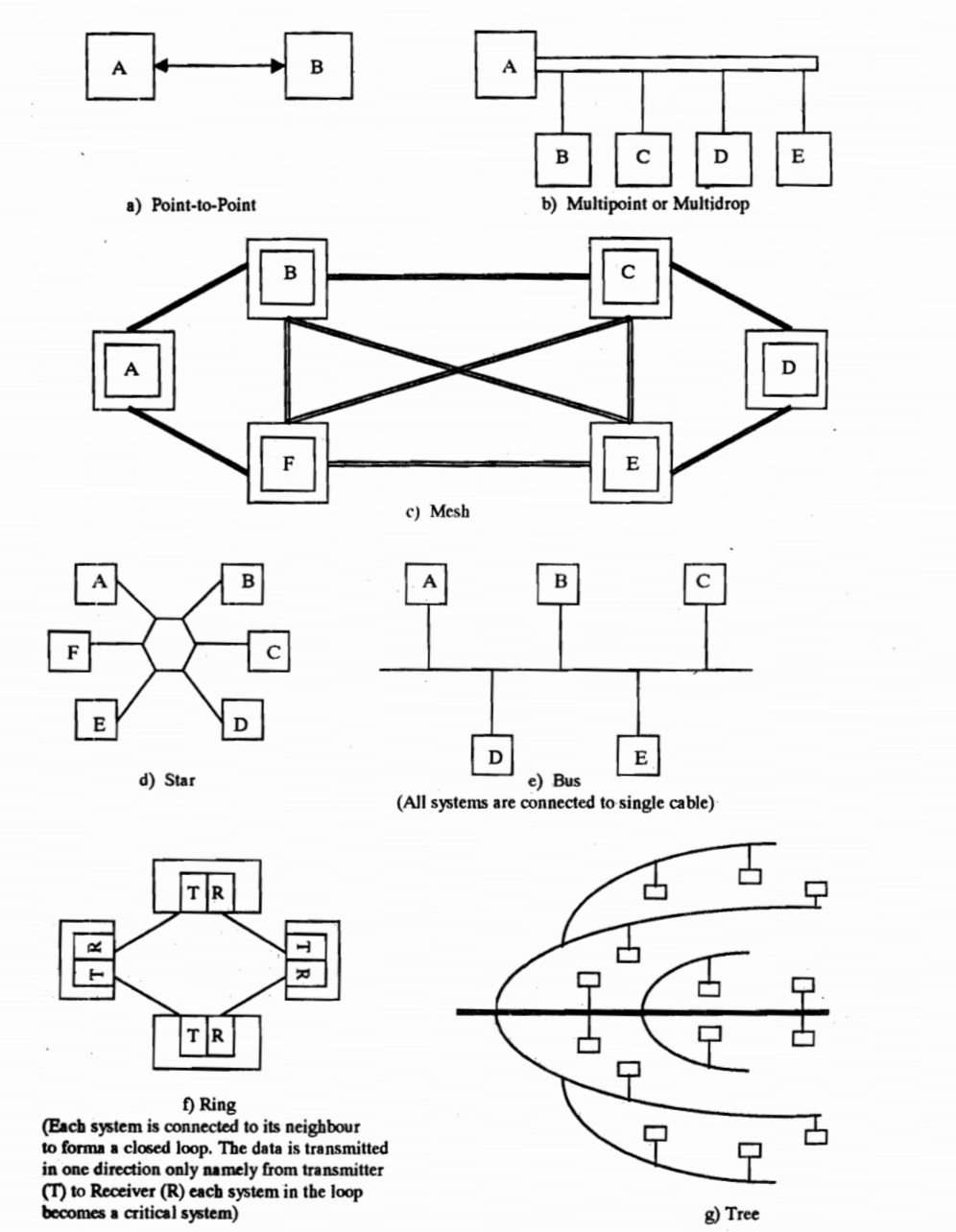
1. Point-to-point
The simplest topology with a dedicated link between two endpoints. Easiest to understand, of the variations of point-to-point topology, is a point-to-point communication channel that appears, to the user, to be permanently associated with the two endpoints. A child’s tin can telephone is one example of a physical dedicated channel.
Using circuit-switching or packet-switching technologies, a point-to-point circuit can be set up dynamically and dropped when no longer needed. Switched point-to-point topologies are the basic model of conventional telephony.
2. Multipoint Topology
More than two specific devices share a single link. Multipoint topology is based on “sharing”. In this type of topology, each node on a network has only one connection.
3. Mesh Topology
A Mesh topology in which the infrastructure nodes (i.e. bridges, switches, and other infrastructure devices) connect directly, dynamically and non-hierarchically to as many other nodes as possible and cooperate with one another to efficiently route data from/to clients. This lack of dependency on one node allows for every node to participate in the relay of information. Mesh networks dynamically self-organize and self-configure, which can reduce installation overhead. The ability to self-configure enables dynamic distribution of workloads, particularly in the event a few nodes should fail. This in turn contributes to fault-tolerance and reduced maintenance costs.
The value of fully meshed networks is proportional to the exponent of the number of subscribers, assuming that communicating groups of any two endpoints, up to and including all the endpoints.
4. Star Topology
In star topology, every peripheral node (computer workstation or any other peripheral) is connected to a central node called a hub or switch. The hub is the server and the peripherals are the clients. The network does not necessarily have to resemble a star to be classified as a star network, but all of the peripheral nodes on the network must be connected to one central hub. All traffic that traverses the network passes through the central hub, which acts as a signal repeater.
The star topology is considered the easiest topology to design and implement. One advantage of the star topology is the simplicity of adding additional nodes. The primary disadvantage of the star topology is that the hub represents a single point of failure. Also, since all peripheral communication must flow through the central hub, the aggregate central bandwidth forms a network bottleneck for large clusters.
5. Bus Topology
In local area networks using bus topology, each node is connected by interface connectors to a single central cable. This is the ‘bus’, also referred to as the backbone, or trunk) – all data transmitted between nodes in the network is transmitted over this common transmission medium and is able to be received by all nodes in the network simultaneously.
A signal containing the address of the intended receiving machine travels from a source machine in both directions to all machines connected to the bus until it finds the intended recipient, which then accepts the data. If the machine address does not match the intended address for the data, the data portion of the signal is ignored. Since the bus topology consists of only one wire it is less expensive to implement than other topologies, but the savings are offset by the higher cost of managing the network. Additionally, since the network is dependent on the single cable, it can be the single point of failure of the network. In this topology data being transferred may be accessed by any node.
6. Ring Topology
A ring topology is a bus topology in a closed loop. Data travels around the ring in one direction. When one node sends data to another, the data passes through each intermediate node on the ring until it reaches its destination. The intermediate nodes repeat (re transmit) the data to keep the signal strong.[5] Every node is a peer; there is no hierarchical relationship of clients and servers. If one node is unable to re transmit data, it severs communication between the nodes before and after it in the bus.
Advantages:
• When the load on the network increases, its performance is better than bus topology.
• There is no need of network server to control the connectivity between workstations.
7. Tree Topology
The tree topology structure gets its name from how the central node functions as a sort of trunk for the network, with nodes extending outward in a branch-like fashion. However, where each node in a star topology is directly connected to the central hub, a tree topology has a parent-child hierarchy to how the nodes are connected. Those connected to the central hub are connected linearly to other nodes, so two connected nodes only share one mutual connection. Because the tree topology structure is both extremely flexible and scalable, it’s often used for wide area networks to support many spread-out devices.
All the above mentioned topology are used in hospitality industry.
Eg- In hotels , different topologies are used to distribute the Wi-Fi signal in every part of the hotel.
Every department is connected with the main server so that whenever the HOD or the GM wants cam access the different reports required.
Q.9. Write a detailed note on the legal aspects of use of computers. (20)
There are many other legal consequences that follow when a user uses a computer. Some of the more important aspects of these such as patents, copyright, protection of trade secrets etc.
1. Patents
A hardware alone is useless without software. If the user has programming capabilities than he or she can develop his or her own software using any language like Basic, Cobol or C etc., Alternatively one may use Dbase, Lotus, unify, Ingress or other general-purpose packages to develop suitable application software. Without taking the trouble to do either of the above, one can buy readymade execution programmes for specific purpose. One can also engage consultants to develop specific software from languages or general-purpose software. Somebody has to develop programmes.
Suppose a user or consultant makes a programme which he or she thinks is original in its own way, then one can legally protect it as own creation by becoming the owner of it in a certain sense. If this were possible, then when others want to use it they can be made liable to pay certain charges on agreed basis. The law on ‘patents’ deals with such situations. Each country has its own legislation on patents. Here the software created is treated as something similar to an invention in, say engineering or a new soft drink formula, etc.
Patenting involves certain procedures. The applicant has to make full disclosure of what he or she has developed. The patenting authority should get convinced that it is not a mere reporduction of something already patented. Again the field of patents and law connected with it are riddled with lots of debates and disputes. Mere intellectual advancements to knowledge such as say a theorem in mathematics etc. cannot be patented, since if that were the situation, free and unfettered advancement of knowledge would be inhibited. It would appear that patenting would be possible of commercial applications. Ordinary computer programmes cannot be patented.
2. Copyright
Copyright is another form of legal protection which software people can resort to for protection of their products. Copyrights can be claimed for data as well as programmes. The former is concerned with the use of information which is copyrighted and stored in retrieval systems. The latter relates to protection of programmes which are marketed to the general public using computers.
There remain a number of problems in deciding how far the law or copyrights relating to intellectual property can be applied to computer programmes.
The basic protection afforded by copyright is directed against reproduction of the form of the original material. If material such as rules of a game can be used without copying, then copyright is not infringed. To obtain copyright protection it is necessary to obtain registration and also affix copyright notice to a computer programme. In order to preserve copyright protection it is essential that there is no unauthorised publication of a programme by purchasers or licencees without explicit reservation of the copyright.
3. Trade Secrets ad Confidentiality
Another method by which a person can protect his other computer programmes is by relying on common law relating to trade secrets and confidentiality. There is no doubt that computer programmes are eligible for this form of protection, so long as they have progressed beyond the stage of general idea to approach some specific problem. Indeed associated documentation such as user’s manual or a flow chart would also be eligible for protection.
In fact this branch of law probably supplies the most widely adopted form of protection for computer programmes as of now. This is especially so in the case of programmes which are written in-house for use by a firm upon its own machine. Here the programmes need never be divulged to anyone outside the firm, and employees can be restrained by contractual provision from making the programmes available to third parties either during their service to the company or even after its termination, at least within reasonable limits.
Contractual provision may be similarly made in aid of the secrecy of programmes which are divulged to third parties by way of sale, lease or license. Detection of abuse, identification of offenders, and certainty of remedy are all enhanced by comparison with patent and copyright protection.
Q.10. Write short notes on any two of the following: (2×10=20)
a. Evolution of computers
Computers have brought about a revolution in the field of computing as a result of technological advancement in the field of electronics.
“Abacus”, the first mathematical device used to facilitate arithmetical computation, was invented by the ancient Chinese before the birth of Christ. Abacus used beads strung of wires to aid arithmetical computations and is believed to have been in use till recently.
The first mechanical ‘Computer’ called ‘Analytical Engine’, designed by Charles Babbage between 1830 and 1850, marked the birth of computer age. This was the first mechanical computer capable of performing basic arithmetical functions. Charles Babbage designed his analytical engine with around five components, namely :
• a STORE to hold numbers,
• an ARITHMETIC UNIT (which he called the ‘Mill’) to perform arithmetical operations,
• a CONTROL UNIT to control and coordinate various activities in the correct sequence,
• an INPUT device to transfer both numbers and instructions into the computer, and
• an OUTPUT device to display the results of computations.
Remarkably even today’s computers are built around the same concepts. However, modern electronic computers provide three major advantages-
• enabling the computer to operate at electronic speeds (an electron travels approximately 1 foot in 1 billionth of a second),
• providing tremendous reliability,
• making the computer a general purpose machine.
The first commercial computer called UNIVAC (Universal Automatic Computer) using vacuum tube circuits was used by the U.S. Census Bureau in 1951. Computers using vacuum tube circuits belonged to First Generation Computers.
Invention of the transistor by Bell Labs in U.S.A. gave birth to Second Generation Computers which used transistors instead of vacuum tubes.
An example of a Second Generation Computer is the IBM 1401.
Third Generation Computers were introduced in the mid-1960s with the invention of tiny integrated circuits on silicon chips.
IBM released its 360 series computers with integrated chips of 28/1000 each sq. carrying more than 1000 circuits.
Large scale integrated chips became available in 1969. Computers which used large scale integrated chips can be called Fourth Generation Computers even though there is no general agreement on what constitutes a Fourth Generation Computer.
Invention of the micro-processor in 1972 changed the computing scene dramatically. A micro-processor when interfaced with memory and input/output units becomes a micro-computer. A micro-computer is very small in size (can be actually placed on a table top) but is very powerful and provides a user-friendly atmosphere for managers to interact with it. The first business micro-computer called APPLE II was released in USA in 1977.
Recent advances in the field of artificial intelligence are being used to design a “thinking computer”. In this case, it has been tried to infuse intelligence into the computers.
These computers can be called Fifth Generation Computers. A special feature anticipated in these computers is their ability to respond to spoken words.
b. Management Information Systems
A management information system has been defined by Davis and Olson as “an integrated user machine system designed for providing information to support operational control, management control and decision-making functions in an organisation. The information systems make use of resources such as hardware, software, men, procedures as well as supplies”.
The information systems are meant for supplying, and not generating, the information to various managers involved in the decision-making process. The information systems are expected to provide processed information to the decision-makers at various management levels in different functional areas throughout the organisation.
To understand the management information systems, it is possible to define it into three constituent components:
• Management: Management has been defined as a process, a function, a profession dealing with the activity of getting the work done with and through people. The various functions of managers include directing, controlling, staffing, leading and motivating.
• Information: Information could be defined as sets of facts, figures and symbols processed for the current decision-making situation. The information is considered to be of significance in a particular situation.
• System: A system is defined as a set of related components, activities, processes, and human beings interacting together so as to accomplish some common objective.
Putting all these three components together, it could be seen that Management Information Systems are sets of related processes, activities, individuals or entities interacting together to provide processed data to the individual managers at various levels in different functional areas.
While defining the Management Information Systems (MIS) the following characteristics should be kept in mind:
a. The Management Information Systems are primarily meant for providing information from the data after processing them. The information systems do not generate data. The data is generated, collected, recorded, stored, processed and retrieved after it has been generated by business operations in an organisation. The information systems follow the procedures designed for processing this data which has been generated within the organisation.
b. The information systems are designed for the job positions rather than for individuals. Regardless of who is the individual holding the job position, the information systems are designed keeping in mind the job responsibilities that the individual is supposed to perform and depends upon the information needs of the individual in the organisational hierarchy.
c. The information systems are designed for different levels of management – they are supposed to cater to the information needs of decision-makers at top, middle and junior levels of management.
d. The information systems are designed for supplying information to managers in different functional areas. The information is supplied to managers in the areas of marketing, finance, production, personnel, materials, logistics, etc.
e. The information systems should be integrated by way of databases. The redundancy in storage of data, processing of data and generation of reports is avoided by way of integration of information systems. Single point data entry and upgradation of data in the master data files should be ensured to minimise chances of discrepancies in the data integrity.
f. The information systems are facilitated with electronic equipment such as faxes, computers and so on.
c. Hacking
Accessing information in a computer illegally is known as “Hacking”. The unauthorised access to information is made possible due to poor computer security systems. Hackers, the persons involved in Hacking, are usually students with ample scope and time on hand to pursue the challenge of unattainable information. Hackers spend a lot of time looking for means to break into high security systems as it is a challenge and a thrill to them. Many a times rival companies use hackers to attain information which can be of use to them. Many insiders also use hackers to retrieve information or destroy some information so as to hit back at their parent organisation.
Hackers also have a Hacker Bulletin Board. A bulletin board is an electronic computer system wherein one user stores information and messages which other users can retrieve and use. An electronic bulletin board is very easy to be installed. The bulletin board of the Hackers usually have information regarding how to break into different software systems and to break into high computer security systems. The boards are used primarily to spread information which would be useful to other hackers such as user account identification, commonly used passwords and so on.
A book, The Hacker’s Handbook, Cornwall, 1985 lists twenty-five most common passwords and suggests the easy ways and techniques for making illegal and successful entries in the different computer security systems. Many hackers also destroy the web-sites on Internet.
Keeping in view the above it becomes very important for us to make proper arrangements to safeguard our information and data. It has been observed that in most of the cases, the hacking is made possible not because of improper security system but due to improper implementation of the security procedure by the concerned personnel. In most of the cases the passwords are very common and easy to decipher.
People consider passwords as the most common and easy manner to install computer security. But giving a password is a matter of consideration. Passwords should be introduced keeping in mind a time period and should be changed accordingly. The new passwords should be known to only a few employees. It is very necessary to check up the employee(s) to whom the passwords are known. These are only a few precaution against Hackers.