
Table of Contents
Q.1. Discuss the various modes through which information is generated. (20)
In the cyclic nature of information production were included publishers, authors, editors, scientists, suppliers, planners, managers of information systems and networks, computer programmers, statisticians, and so on. As many of them are generating new information, they are labeled ‘information workers’ at least as much as the librarians and information scientists who are mostly providing access to existing information.The Modes of Information generation are –
1. Authors
Author is the creator of information or of messages. An author may be the originator of an electronic-mail message confirming an appointment of an original scholarly paper or a book. The author is the person or persons who have created the document and the document bears his or her name. The author may be an individual, an organisation (corporate body) or an unidentified author, i.e., an anonymous document.They are also users of all the information services and discovered word processing, electronic-mail, and database searching. Their prime functions are to create, formulate or relate.
2. Editor(s)
The editor is the person responsible for a publication that groups together the contributions of several authors, with or without one from himself or herself. The publications are termed as ‘collective works’ (e.g., Conference proceedings) and bears his or her relationship with the work – ‘ed.’ (editor) or ‘responsible for publication’, or ‘comp.’ (compiler) or ‘trans.’ (translator) and so on. Their role is to help accomplish the joint mission of authors and publishers, to produce an information product that users will want.3. Primary Publishers
They manage the process of bringing authors’ work into usable form and distributing it to users. Changes in the telecommunications technology have resulted in the repackage of information. That is, users do not need to buy large volumes of directories and indexes, but can have a service which will enable them to find what they want, and only as they want it. (printed vs telephones). Thus one of the publisher’s role is to anticipate these changes and react accordingly.4. Secondary Publishers/Database Producers
They have played the role of enabling users to access the published information of a field. Their role is increasingly shifting from the conventional printed products, such as abstracts, indexes, etc. to the online mode and full-text materials.5. Libraries
Libraries are termed as treasure house of knowledge. Though varied in nature, they collect, organise and preserve documents and make them available to users through reproduction of documents, retrospective searches, referral and question-answer services, etc. They also serve as a venue for lectures, exhibitions and other events. Depending on their nature and the role they play in the information cycle. In tourism they are used for travel writing, destination information, tour planning, etc.They are divided as follows:
a. National Archives
A state institution whose function is to receive, preserve and make available to authorised users the documents of national and local public administration, individual people and to some extent public companies and private organisations. They make extensive use of microfilm (for space and security reasons) and information is communicated after a lapse of time and under certain conditions.b. National Library
It is a state institution and acquires, processes, conserves and makes available information to the public – published in the country and elsewhere relevant to the country or national activities. Through their specialised departments they provide technical advice to all the libraries and their major publication is the “National Bibliography”.c. Public Libraries
Institutions run by the state or the local authorities, concerned with the preservation collections on cultural, recreational or practical needs of the local community as an indispensable source of information.d. University (Academic) Libraries
Located in the universities and institutions of higher education, are concerned with the information provision through normal library services. Established to support the scientific and technical information of the scholars, students, etc., they also publish thesis, university’s ongoing research activities, etc.e. Special Libraries
These are varied in their nature depending on what they specialise in, i.e., concentrate on a single discipline or field of knowledge. For example, the tourist department’s library would concentrate on tourism.6. Documentation Centres
Both special libraries and large companies establish these centres where production depends upon access to economic and technological information. The information products include bulletins, machine-readable files, etc.7. Information Analysis Centres (IACs)
These are advanced forms of information centres, attached to research centres. Their function is to evaluate current knowledge on specific subjects and to provide directly usable information. Further, they play a role in stimulating research by pin-pointing gaps in knowledge or shortcomings and their work entails as much attention to factual data as to specialist literature.The information needs on numerical data on a particular subject field (e.g., toxicity of certain chemical products) are dealt with by the “Data Centres”, which serve to collect, arrange and store such information for use.
8. Databanks
These are usually concerned with a broader field such as the counter-indications of medicines or town planning data and to user queries like: Is such and such destination safe to be visited by tourist? What are the dangers and how they can be avoided?To meet these demands, databases use very precise guides to extract the raw data from data collections and the relevant literature, arrange them in structured files so as to be ready for subsequent processing for providing the right answers. Thus, databases can be used directly for decision making or a piece of research, obviating the need to consult primary documents or other sources of information.
9. Information Networks
Information networks comprise a group of individuals or organisations that exchange information in various forms on a regular and organised basis.They are established with a set of objectives: ‘the need for knowledge’, less burden, share tasks, pool resources with a formal structure, common procedures and techniques.
They are based on a particular territorial unit – a city, region or country and others are specified to that particular task: for instance the creation of shared database, loans, and so forth. The network may be decentralised, centralised or a mixed one.
10. Users
The user is the focal point of all the information systems. The concept of ‘user’, though unclear, points out that he or she is both a consumer as well as a producer of information. For example, a travel writer, is a producer of information through articles and a user of referral and bibliographic search services when seeking documents to help with his or her articles for communicating one’s opinions/messages to the public.Q.2. What are the different approaches which are used to define the subsystems of a Management Information System ? How organization is acting as an Information Processing Unit ? (20)
The information gets processed within an organisation as it travels from clerical level to the top levels of management. Image shows how the information gets processed within an organisation. It could be seen from the image that the data is collected from units like customers, internal operations, competition and external data on economy and market, etc. The collected data is processed so as to generate the outputs usually in the form of information reports.This output is information and leads to managerial action. The processed information is also disseminated to the members of the organisation, public at large, stockholders as well as government and regulatory agencies. It could also be seen from the figures that information is the only linking thread between the external environment and the internal members of the organisation.
 Information processing in an organisation
The various subsystems of any information system could be better understood by looking at it from the organisation’s point of view.
The two approaches used to define the subsystems of a MIS (Management Information System) are –
1. Organisational functional subsystems
2. Activity subsystems
The various functional areas which could be separated from the MIS point of view are stated under. The major subsystems and the typical reports generated within each functional area are given as under :
Functional Subsystems with their some typical reports are –
• Marketing
Marketing Analysis & Sales Forecasting Report, Sales Planning Report, Customer and Sales Analysis Report
• Production/Service
Service/Production Planning Reports, Cost Analysis & Control Reports, Quality Control Report
• Personnel
Personnel Information Reports, Performance Appraisal Reports, Training & Leave Records
• Finance & Accounting
General Accounting Reports, Payroll Accounting Reports, Bonus & IT Reports, Financial Analysis Reports, Cost Analysis Reports.
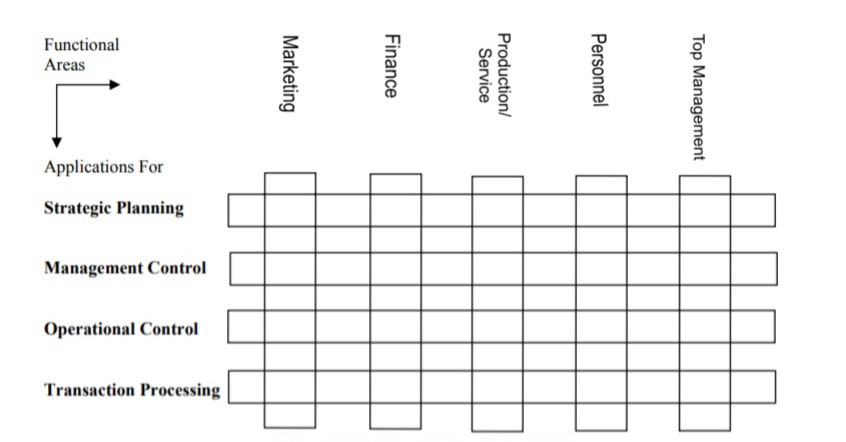
Various subsystem of MIS
The information subsystems could also be understood by looking at the subsystem from activity point of view. In each functional area, the processing activity could be done at four different levels. These levels are handled by different levels of manpower within the organisation.
For example, in tour operation the filing and processing of a tour group is usually looked after by the desk executive, whereas the operational control activity is the responsibility of junior levels of management/management executive. The management control and strategic planning functions are direct responsibilities of middle and top levels of management respectively.
The typical user profile for these activity subsystems are –
• Transaction processing Executive
• Operational control
Junior Level Managers / Management Executive
• Management control
Middle Level Managers
• Strategic planning
Top Level Manager
The various functional areas are integrated through the common database which is an integral part of the information system in an organisation. The processed data from marketing function is stored in the database and whenever it is required, it is fed over to the production.
Q.3. Discuss the advantages and disadvantages of computer based managerial decision making. In support of your answer give suitable examples. (20)
The advantages associated with computer-based managerial decision-making can be the following :
1. Response time is greatly reduced,
2. Very large data are stored for information and decision-making
3. Accuracy of information is considerably improved, thereby improving the quality of the decision,
4. Problems are handled more easily by using various operation research models,
5. The cost involved in the decision-making process is reduced,
6. More secrecy is observed as compared to manual file system
7. Ability to take quick decision improves considerably as the time for retrieval of information is very fast,
8. Paper work is reduced to the minimum as all the information is stored in the computer itself,
9. Lots of information are stored for future reference,
10. Chances of leakage of classified information are reduced,
11. Accuracy in manipulation is increased very much,
12. Time spent in various decision-making activities is reduced to a minimum.
Emanating from the above, the following benefits for a commercial organisation can be attributed to computerisation :
1. The availability of accurate forecasts within 1 per cent of net income,
2. The preparation of short-term profit plans and long-term projections,
3. The provision of pre-plan information in budget preparation,
4. The calculation of variances between budgeted and actual results,
5. The triggering of revised forecasts if not proceeding in accordance with plans,
6. The early warning system for monitoring activities and the signalling of necessary reactive plans,
7. The indication of income and cash flow by following alternate investment strategies,
8. The assistance to the planning of new facilities and a host of special strides,
9. The accomplishment of the preceding items at a great speed.
While TPS has been in use over several decades, OAS is coming into practice only now in a number of organisations. The TPS has brought its own benefits for speedy execution, accurate performance and quite often confidential handling. Such benefits will become evident if one considers a couple of very common TPS applications.
In an airlines, the computerisation of the Ticketing Section has resulted in an easy ticketing procedure and also helps the ticketing agents of the airlines who can get the system on their computers. Moreover, now a days the customer care cargo, marketing departments and others are also computerised. This makes the customer needs easy to handle. Similarly most of the travel agencies have linked themselves to Computerised Reservation Systems of hotels, airlines, car rentals, etc. This not only saves time and energy, but also helps them in providing better services and instant bookings to the customers.
Advantages of MIS can be manifold because of the aid to higher level decision-making. Once the planning, monitoring, reviewing and control process are facilitated, the benefits can literally multiply several times, over and above the mere shop-floor or clerical TPS applications.
Some disadvantages are
• Information Overload
A computerized decision making system may sometimes result in information overload. Since it analyzes all aspects of a problem, it leaves a user in a dilemma what to consider and what not to consider. Not each bite of information is necessary in decision making. But when it’s present, a decision maker finds it difficult to ignore information that is not a priority.• Too much Dependence on DSS
It is true that decision support systems are integrated into businesses to make everyday decisions faster and more easily. Some decision makers develop a tendency to depend too much on computerized decision making and don’t want to apply their own brains. Clearly, there is a shift in focus and decision makers may not hone their skills further because of excessive dependence on DSS.• Devaluation of Subjectivity
A decision support system promotes rational decision making by suggesting alternatives basis the objectivity. While bounded rationality or restricted irrationality plays a critical role in decision making, subjectivity cannot and should not be rejected. A DSS promotes objectivity and relegates subjectivity, which can have serious impact on a business.• Overemphasis on Decision Making
Clearly the focus of computerized decision making is on considering all aspects of a problem all the time, which may not be required in many of the situations. It is essentially important to train the users to ensure effective and optimal use of DSS.• Cost of Development
The cost of decision making decreases once a decision support system is installed. But development and implementation of a DSS requires a huge monetary investment. Customization may attract higher cost. If you’re on a tight budget, you might not get a customized DSS specific to your needs.Q.4. What is “micro-computers” ? What are the reasons for popularity of micro-computers? Substantiate your answer with suitable examples from hospitality industry. (20)
A personal computer (PC) is a micro-computer which has its entire central processing unit on a single micro-processor chip. A PC provides a main memory capacity upto 640 kilo bytes and a processing power of 0.5 MIPS. It supports one or 2 diskette drives of 360 KB each for random access secondary memory. A PC usually comes with a standard keyboard, a visual display unit and a dot matrix printer. A PC is usually operated by a single user and not suitable for applications requiring very large storage capacities. PCs are commonly used for word processing, desktop publishing, accounting and so on.Micro-computers are computers which have their entire Central Processing Unit (CPU) on a single integrated circuit ‘chip’ (called a micro-processor). Today powerful micro-computers are available which cost as little as Rs.20,000/-
These micro-computers can do many of the jobs earlier done by large computers which cost many times this amount. In addition, because they are small enough to sit on a desk and do not require extensive environmental control, they can be used in most reasonably dust-free environments.
This ready availability for users has enabled a large number of entirely new applications to be undertaken. It has also increased user interest in computing since users can be directly in control of their data unlike the situation with centralised computing.
Due to these factors and the fact that micro-computers can be used at home and schools for education and entertainment there has been a spectacular increase in their numbers since their first arrival as hobby kits in the U.S. Several million micro-computers are used in management applications around the world today. PCs are widely used in India and specially in tourism sector.
Hotels, Airlines and Railways use computers for reservations. Tour sector is also using PCs for making vouchers, bills, invoices, etc. and thus save time, whereas the travel agencies use them for ticketing. At the same time they are being used for information seeking, storage, analysis and retrieving.
Microcomputers, today, aren’t just the most popular computers; they’re the only kind of computer currently being made and sold commercially. Even a large IBM mainframe is a microcomputer, as it is built from central processing units that are microprocessors, where the entire CPU is on a single monolithic chip.
The integrated circuits have improved so much that we can put a whole CPU on a single chip, there is no point in, instead, building the same CPU, but out of individual discrete transistors, or, worse yet, vacuum tubes; it would cost much more money, and not work any better: in fact, it would be slower because of the time needed for signals to travel down longer wires.
When the first microprocessors were developed, they could only do arithmetic on small integers eight bits long, so computers that could directly handle 64-bit double-precision floating-point numbers still had to be built out of many integrated circuits, each containing only part of the computer.
Today, though, there is no useful way improve the power of a computer’s central processing unit by making it too big to fit on a single chip; in fact, the capacity of chips is such that the industry has recently changed from chips with four CPUs on them to chips with eight CPUs on them as the standard.
Q.5. Write short notes on: (10×2=20)
a. OSI Reference Model
OSI stands for Open Systems Interconnection. It has been developed by ISO – ‘International Organization of Standardization‘, in the year 1984. It is a 7 layer architecture with each layer having specific functionality to perform. All these 7 layers work collaboratively to transmit the data from one person to another across the globe.
 Layers of OSI
1. Physical Layer (Layer 1)
The lowest layer of the OSI reference model is the physical layer. It is responsible for the actual physical connection between the devices. The physical layer contains information in the form of bits. It is responsible for transmitting individual bits from one node to the next. When receiving data, this layer will get the signal received and convert it into 0s and 1s and send them to the Data Link layer, which will put the frame back together.2. Data Link Layer (DLL) (Layer 2)
The data link layer is responsible for the node to node delivery of the message. The main function of this layer is to make sure data transfer is error-free from one node to another, over the physical layer. When a packet arrives in a network, it is the responsibility of DLL to transmit it to the Host using its MAC address.Data Link Layer is divided into two sub layers :
a. Logical Link Control (LLC)
b. Media Access Control (MAC)
3. Network Layer (Layer 3)
Network layer works for the transmission of data from one host to the other located in different networks. It also takes care of packet routing i.e. selection of the shortest path to transmit the packet, from the number of routes available. The sender & receiver’s IP address are placed in the header by the network layer.4. Transport Layer (Layer 4)
Transport layer provides services to application layer and takes services from network layer. The data in the transport layer is referred to as Segments. It is responsible for the End to End Delivery of the complete message. The transport layer also provides the acknowledgement of the successful data transmission and re-transmits the data if an error is found.5. Session Layer (Layer 5)
This layer is responsible for establishment of connection, maintenance of sessions, authentication and also ensures security.6. Presentation Layer (Layer 6)
Presentation layer is also called the Translation layer.The data from the application layer is extracted here and manipulated as per the required format to transmit over the network.7. Application Layer (Layer 7)
At the very top of the OSI Reference Model stack of layers, we find Application layer which is implemented by the network applications. These applications produce the data, which has to be transferred over the network. This layer also serves as a window for the application services to access the network and for displaying the received information to the user.Ex: Application – Browsers, Skype Messenger etc.
b. Applications of Networks
Popular network applications are file transfer, electronic mail, bulletin board, remote login, remote program execution, remote database access and resource sharing. The three applications namely file transfer, electronic mall and bulletin board result in transfer of data from one station to another. The applications like remote login, remote program execution and remote database access imply that a conversational link be established tween two systems. The resource sharing application implies that all the stations share a particular resource available in anyone or a few stations on the network.A resource can be either hardware like a powerful CPU, laser printer, plotter, etc. or software like language compiler or an application program. All these applications have their own requirements and they have to be mapped on to the network in an appropriate manner.
While the layers of software as described by the standards ensure error free communication between two stations the applications have their own requirements of protocols:
For example, even though data Is physically transferred from one station to another in the case of file transfer and electronic mail the protocol requirements for these two applications are quite different. For example, the file transfer tries to identify receiver station and establishes a logical link over which the entire file is transmitted.
At every step, messages are exchanged between the sender and the receiver so that both of them know that the file has been transmitted fully and correctly. On the other band, the electronic mail system functionally is very similar to the postal system in our country. The sender gives the message to an ‘Agent’ who then transfers it to another agent in whose domain the recipient of the message resides. This is similar to one person writing a letter to another using the postal system. The sender may be in Chennai and the receiver may be In Delhi . The sender prepares the letter, writes the address and gives it to the agent through Mail Box.
The agent (in this case is the Post Office in whose domain the sender lives) sorts the letters and sends it to his counterpart in Delhi. The exchange of letters between the post offices is similar to the exchange between Mail transfer Agents.
In the case of an electronic bulletin board, a given message Is transmitted In a broadcast mode to a group or users called recipients. The group is a subset of the total number or men available on the network and is selectively chosen depending on the message. For example, ln an academic department, a notice about a particular conference will be of interest only to those people who are actively working in the area covered by the concern and who are likely to contribute to the conference. On the contrary, a general, information like a faculty meeting will be of interest to everybody.
The networks can be used in a variety of environments. For each environment, the major activities in the environment will decide the applicability of Networks to that environment. Some examples of environments are administrative offices, finance and insurance, transport, hotels, manufacturer and hospitals.
An administrative office has got both clerical service supporting the main business of the organisation and the supervisory services supporting the decision making process of the organisation. Traditionally, a single mainframe computer with terminals in each department was the model of an automated office.
With the full availability or PCs, an internal electronic mall can effectively replace the movement of paper within the office. The traditional services like client-account servicing, client-record accessing, documentation control and distribution, financial administration and purchasing and sales can all be Integrated into a Network which is nothing but an effective Interconnection of PCs.
Q.6. What do you understand by “Stage Growth Hypothesis” ? Describe different stages of Nolan Growth Model. (20)
For studying the growth of the MIS activity in an organisation we could apply the model developed by Richard Nolan in 1979, popularly known as the Stage Growth Hypothesis. This six-stage model very clearly explains the stage by stage development of the MIS function in an organisation. This model provides a framework for the analyst to understand the reasons for success or failure of the MIS function in an organisation and also assists in developing solutions to take the functions ahead.According to this model, there are distinctive features associated with each and every stage of the growth of the MIS function in an organisation from which the decision-makers can understand the growth pattern and use the MIS function to the strategic advantage of the organisation.
 Nolan Six Stage Growth Model
Above image depicts the framework suggested by Nolan. In this figure, the horizontal axis shows the stages of growth, and the vertical axis shows the growth processes of the MIS function. The curve on the graph shows the trend of the MIS budgets. It could be noted that the budget curve shows an upward trend till the third stage, and becomes more level towards the beginning of the fifth stage onwards.
The different stages discussed in the model are as under :
Stage-1 : Initiation
The first time the organisation buys and installs a computer system, the MIS function in the organisation has entered this phase. Since most medium and large-sized companies have installations of the computer systems, this stage is already reached as far as the majority of the organisations are concerned. During this stage, the following features may be distinctive :a. Functional cost reduction applications,
b. Specialist DP organisation for technological learning,
c. Lack of strict planning and control in the MIS function
d. Hands-off training for user awareness.
Stage-2 : Contagion
The second stage involves a rapid proliferation of the computer resource all over the organisation, sometimes based on the actual organisational needs and sometimes just to add some equipment to feel important in the organisation. This is the phase when most of the organisational units feel that they should have an access to the computer hardware, develop software and have the trained manpower working in their units. Every unit head wishes to have some computer resource controlled exclusively by himself or herself. The budgets go shooting up without any controls. The applications are developed in an independent manner, and this results in duplicated efforts and systems. This stage is marked by the following characteristics :a. Proliferation of applications,
b. User-oriented departmental programmers,
c. More relaxed planning and control of MIS function,
d. Users are superficially enthusiastic without sincere involvement.
Stage-3 : Control
It is towards the end of the second stage that the management gets conscious of the fact that the benefits being derived are not in proportion to the actual expenditure on the MIS activity, and the organisation starts exercising control and some restraint in sanctioning the budgets. The management takes serious interest in planning the function, and it results in a better control on the activity. The major highlights of this stage are :a. Upgradation of the documentation and modification of existing applications,
b. Middle level management to look after the MIS function,
c. Formalised planning and control of MIS function,
d. Users are involved with some accountability imposed on them.
Stage-4 : Integration
After the management has been able to provide the control guidelines to the MIS function, the organisation starts thinking in terms of integrated applications so as to avoid the duplication of efforts and systems, as well as, providing better levels of integrity to the systems and data. The budgets, once again, start looking high. This stage is marked by the following characteristics :a. Retrofitting the existing applications using data base technology,
b. Establishing the computer utility and the user accounts teams,
c. Tailor-made planning and control systems,
d. The user accountability to learn and involve in the systems.
Stage-5 : Data Administration
With the integration of the applications using a data base environment in the fourth stage, the MIS function in the organisation undergoes a major change in the functional outlook. The technical expertise looses over to the management process and responsiveness to the users, and the data becomes the most crucial resource in the organisation to be managed. The stage is characterised by the following features :a. The application are further integrated as per the organisational requirements,
b.The data-processing organisation is for the data administration,
c. The systems are based on data and system sharing basis,
d. The user becomes effectively accountable for the MIS systems.
Stage-6 : Maturity
It is almost impossible to attain the sixth stage of maturity when everything has been achieved, and the MIS systems will never fail themselves or fail the organisations. The applications by this stage have been incorporated into the organisational functioning and these are as per the strategic requirements of the organisation. The technology has become an integral part of the organisational thinking, philosophy and systems. Some of the major features related to this stage are :a. Integration of application mirrors the organisational strategic choices,
b. The emphasis is on the data resource management rather than on the system management,
c. Data resource has become the key factor in strategic planning,
d. The users and data-processing professionals share the responsibility of the MIS function, jointly and willingly.
Q.7. Discuss the role of MIS at various management levels. List a few desirable characteristics of MIS. (20)
Management information systems as the study of information systems in business and management. The term management information systems (MIS) also designates a specific category of information systems serving management-level functions.Management information systems (MIS) serve the management level of the organization, providing managers with reports and often online access to the organization’s current performance and historical records. Typically, MIS are oriented almost exclusively to internal, not environmental or external, events. MIS primarily serve the functions of planning, controlling, and decision making at the management level. Generally, they depend on underlying transaction processing systems for their data.
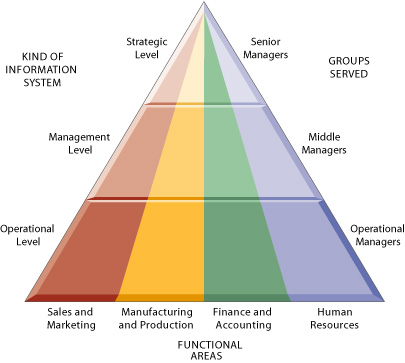
Operational-level systems support operational managers by keeping track of the elementary activities and transactions of the organization, such as sales, receipts, cash deposits, payroll, credit decisions, and the flow of materials in a factory. The principal purpose of systems at this level is to answer routine questions and to track the flow of transactions through the organization.
Examples of operational-level systems include a system to record bank deposits from automatic teller machines or one that tracks the number of hours worked each day by employees on a factory floor.
Management-level systems serve the monitoring, controlling, decision-making, and administrative activities of middle managers. Management-level systems typically provide periodic reports rather than instant information on operations.
An example is a relocation control system that reports on the total moving, house-hunting, and home financing costs for employees in all company divisions, noting wherever actual costs exceed budgets.
Some management-level systems support nonroutine decision making. They tend to focus on less-structured decisions for which information requirements are not always clear.
Strategic-level systems help senior management tackle and address strategic issues and long-term trends, both in the firm and in the external environment. Their principal concern is matching changes in the external environment with existing organizational capability.
Characteristics of MIS
a. The Management Information Systems are primarily meant for providing information from the data after processing them. The information systems do not generate data. The data is generated, collected, recorded, stored, processed and retrieved after it has been generated by business operations in an organisation. The information systems follow the procedures designed for processing this data which has been generated within the organisation.
b. The information systems are designed for the job positions rather than for individuals. Regardless of who is the individual holding the job position, the information systems are designed keeping in mind the job responsibilities that the individual is supposed to perform and depends upon the information needs of the individual in the organisational hierarchy.
c. The information systems are designed for different levels of management – they are supposed to cater to the information needs of decision-makers at top, middle and junior levels of management.
d. The information systems are designed for supplying information to managers in different functional areas. The information is supplied to managers in the areas of marketing, finance, production, personnel, materials, logistics, etc.
e. The information systems should be integrated by way of databases. The redundancy in storage of data, processing of data and generation of reports is avoided by way of integration of information systems. Single point data entry and upgradation of data in the master data files should be ensured to minimise chances of discrepancies in the data integrity.
f. The information systems are facilitated with electronic equipment such as faxes, computers and so on.
Q.8. Discuss various aspects and components of system life cycle in a Computer Based Information System (CBIS). (20)
The various stages in the life cycle of a CBIS are –
1. Objectives and Feasibility
The first and the most important step is to provide a broad statement of organisational objectives, for the proposed CBIS. This is primarily a responsibility of the top management, since this Information System is expected to help the organisation and the management in the discharge of their function. The Information Systems development effort begins by understanding the organisations objectives, for these are required to be translated to constitute the objectives of the Information System.The next step is to examine the feasibility of the proposed system. This involves considering various broad alternatives, such as, valuating the costs and benefits of the system. Initially a rough cost-benefit analysis will be sufficient for the top management to take a decision either in favour of or against the proposed CBIS.
2. System Analysis
Systems Analysis is the next stage in the life cycle of a CBIS. The system analysis includes review of the existing procedures and information flow. Decision-making and individual information needs at various levels in different functional areas are also reviewed. The system analysis phase primarily focuses on isolation of deficiencies from the existing system.The fundamental activities involved in the system analysis are:
• Definition of the overall system,
• Separation of the system into smaller and manageable parts, and
• Understanding the nature, functions and interrelationships of various subsystems.
The analysis of the information systems could be done with the help of various tools of system analysis. Some of the tools which are available with the system analysts are :
a. Review of Documentation
b. Observation of the Situation
c. Conducting Interviews
d. Questionnaire Administration
Systems Analysis involves teamwork and a considerable amount of time. A clearer picture of costs and benefits of alternative approaches will emerge from a detailed study of the proposed system. Involvement of ultimate users of CBIS is very crucial at this stage itself, so that the acceptance of CBIS upon implementation will be relatively easy.
3. System Design (Logical)
If the system analysts phase defines the way things are, the Logical System Design phase defines the way things should be for the same problem.
The system development phase includes mapping of the business requirements of the managers on to the proposed system. The conceptual design for the model which has been developed in the problem definition stage is enlarged to understand the actual flow of data and the logical model is developed. The logical model is worked out to finally develop and test the physical system in the system development phase.
A logical representation of data flow analysis and data processing analysis in a CBIS can be effectively provided through structured system design tools. These are:
a. Data Flow Diagram
A Data Flow Diagram (DFD) is a graphical representation to depict the flow of data in a CBIS. It should be realised that a DFD provides only a logical data flow and not a physical data flow.b. Data Dictionary for Data Flow Analysis
A Data Dictionary (DD) is intended to provide a complete documentation of all the elements of a Data Flow Diagram, namely data items, data stores, and data flows.c. Decision Tables
A decision table displays and documents clearly the processing logic for each processing step identified in a DFD.d. Decision Trees
A decision tree is another way to document processing logic, specially when the number of alternatives is not too many. Combination of conditions are represented along the branches of a decision tree. The outcome of each of these combinations is given at the end of the final branch.4. System Design (Physical)
While a logical design provides an estimate of processing requirements, a physical design involves mapping the logical design onto the physical hardware of a computer system. Upgrading the existing hardware and/or acquiring a new computer system if required to meet the processing requirements is also undertaken at this stage.The system analysts assign specific responsibilities to the programmers who develop and test the programmes. The development and testing of the systems take place in a phased manner:
• Development and testing of the individual programmes,
• Development and testing of the individual programmes as a part of the system modules,
• Development and testing of the system modules as a part of the major subsystems, and
• Development and testing of the major subsystems as a part of the proposed system.
5. Implementation
Once the system has been declared fully developed and tested by the development team, it is ready for implementation. Actual programming is undertaken at this stage to implement the proposed CBIS in the available hardware. The involvement of the user is necessary throughout the project duration, but the user involvement is critical during this phase.
The implementation includes the following activities:
• Programme development and planning for implementation,
• Preparing the schedule for implementation,
• Procurement of hardware,
• Installation of software,
• Operation and testing of software on hardware,
• Getting acceptance of the CBIS from its users,
• Recruitment of operating personnel,
• Motivation and training of the selected personnel and users,
• Preparing user manual and documentations,
• Conversion of data files from old system,
• Final changeover, and
• Operation and production.
6. Maintenance
Though the system is thoroughly tested before the implementation, yet the system is never foolproof and errors always continue to exist. Therefore, there is a need to have a systems person to look after the system and maintain it even during the operation and production.
As users develop faith in a CBIS, their demands on the system will grow. The system design should be flexible enough to accommodate future requests, refinements, modifications, and changes to suit users’ requirements. Well documented logical and physical designs of a CBIS will facilitate its maintenance considerably.
 The various activities in the development of CBIS
Q.9. Write an essay on “Protecting Information in Computer.” (20)
Computer virus is a major cause of data corruption.
Computer virus is a perverse software which causes a malicious activity. It is a relatively new phenomenon which has resulted mainly due to advancement in technology and accessibility of operating systems such as DOS. Previously, the operating system used to be secretive and hidden from the user.
Perverse Software is identified under following main heads:
1. Time Bomb
It is a simplest kind of piece of code/ perverse software that is activated on a particular day at a particular time or under given conditions to initiate a fraud, a disruption or some other sort of perverse activity, e.g. causing or destructions of stored information. This software is activated by computer clock.2. Logic Bomb
Software similar to time bomb but activated by a combination of events rather than by the computer clock on a particular day or at a particular time.3. Trojan Horse
Trojans are the programs that seem to do some harmless activity and actually do some malicious activity causing damage immediately like the wooden horse of Troy. For example, it may obtain a password or may modify records in protected files. It may render the system transparent to illicit users. Horse acts as a parasite. It generally does not damage the host system and the system can continue to function normally. Trojans normally do not insect other software in the system. For example, Christmas card.4. Worms
The concept of Worms was related to trojan horses. Characteristic of a worm program is that it can relocate i.e. copy itself to another machine on network. Worm program can serve various purposes. They can help to sabotage systems but can also perform useful tasks. Some examples of worms are Existential Worm. Alarm Clock Worm etc.5. Viruses
All the above concepts of perverse software, i.e. bombs, trojan horses and auto relocatable program lead to the generation of a most dangerous perverse software called Computer Virus. Please keep in mind that Computer Virus is ONLY a software. Like biological viruses, it can be replicating in nature and can attach itself to a regularly used programs and make you feel that the host file is benign although it intends to do much more. Viruses are highly contagious in nature and cause considerable damage through an information disorder/destruction.6. Rootkits
It is a technique which prevents the destructive processes to be visible as running program and making them able to keep on destroying the system. These are installed usually by Trojans and pretend to be operating system files which are necessary for functioning of the system so user will not delete them.7. Trap doors
It is a back way or a hidden method or other way of by passing traditional security in order to gain access to a secure system. A malware prepares trap doors in the system for entering in these easily in future.8. Spyware
These are designed to show alluring advertisements and redirect the search engines to paid advertisements to get access to user’s data. These work in a hidden style.Preventive Measures
We must observe the following precautions while working with computers to protect from perverse software.
1. Keep ‘Write protect” tabs on all your system disks. If possible/available, go for virus protection software/ hardware.
2. Do not use illegitimate copies of software.
3. Don’t accept free software that looks too good to be true. Buy software only from proven source. Accept the software which is shrink wrapped or securely contained or scaled.
4. Provide physical security for your computers i.e. Locked rooms, locks on the computers etc. Log-out while leaving terminal/ system.
5. Do not use external floppy disks. If you are unsure of a floppy disk or a specific program, run it in an isolated environment where it will not be able to do any damage or scan the floppy before using it.
6. Avoid swapping floppies across machines..
7. Avoid Booting from many floppies, in case your system does not have a hard disk.
8. Check all floppy disks periodically and remove infected programs immediately.
9. Change your passwords frequently.
10. Establish a sound Back-up policy. Make sure you can have at least three sets of back-up disks that you can rotate through a regular cycle of use.
Treatment
There are various ways by which virus can be removed. Some of them are given below:
1. Writing another virus which replicates and kills the harmful virus.
2. Using anti-virus software available in market. Some of the anti-virus software are memory resident and can be put in “AUTOEXEC. BAT” so that they become functional soon after the computer is switched on. When it detects the presence of offending code, the computer is locked and a warning message is flashed on the screen. Afterwards software proceeds to eliminate the virus from the computer by overwriting on the offending parts.
3. Switch off the system. Boot from A: drive by using uninfected floppy. Attempt to overwrite the Boot-sector using special programs. This procedure is successful in some cases. The other method is to erase the boot record with zeros and then replace it using certain utilities.
4. Another procedure is to search the entire disk, sector by sector, until the virus program segment is located. Then write original boot record over the virus shoe record and erase the infected program segment.
5. One of the common techniques is to search only those sectors marked as bad by FAT (File Allocation Table) and then remove the bad sectors.
Q.10. Write short notes on: (10×2=20)
a. Legal aspects of use of computers
There are many other legal consequences that follow when a user uses a computer. Some of the more important aspects of these such as patents, copyright, protection of trade secrets etc.
1. Patents
A hardware alone is useless without software. If the user has programming capabilities than he or she can develop his or her own software using any language like Basic, Cobol or C etc., Alternatively one may use Dbase, Lotus, unify, Ingress or other general-purpose packages to develop suitable application software. Without taking the trouble to do either of the above, one can buy readymade execution programmes for specific purpose. One can also engage consultants to develop specific software from languages or general-purpose software. Somebody has to develop programmes.Patenting involves certain procedures. The applicant has to make full disclosure of what he or she has developed. The patenting authority should get convinced that it is not a mere reproduction of something already patented. Again the field of patents and law connected with it are riddled with lots of debates and disputes.
2. Copyright
Copyright is another form of legal protection which software people can resort to for protection of their products. Copyrights can be claimed for data as well as programmes. The former is concerned with the use of information which is copyrighted and stored in retrieval systems. The latter relates to protection of programmes which are marketed to the general public using computers.There remain a number of problems in deciding how far the law or copyrights relating to intellectual property can be applied to computer programmes.
3. Trade Secrets and Confidentiality
Another method by which a person can protect his other computer programmes is by relying on common law relating to trade secrets and confidentiality. There is no doubt that computer programmes are eligible for this form of protection, so long as they have progressed beyond the stage of general idea to approach some specific problem. Indeed associated documentation such as user’s manual or a flow chart would also be eligible for protection.Contractual provision may be similarly made in aid of the secrecy of programmes which are divulged to third parties by way of sale, lease or license. Detection of abuse, identification of offenders, and certainty of remedy are all enhanced by comparison with patent and copyright protection
b. Purchase or sale of computers in India
Computer technology being relatively new to developing countries like India, the consumer is rarely aware of even the fundamentals of computers. Also consumerism is still very weak in developing countries. As a result the sellers dump their products on the consumer. The customer often buys a computer as children buy toys. Most consumers buy without knowing what they actually want to do with the computer or whether the computer which they are buying will really suit their specific requirements.
A. Purchase/Sale – A Contract
Every purchase of any movable article is a contract covered by the provisions of a branch of contract law known as sale of goods. In India, for example, sale of goods is governed by the provisions of the Sale of Goods Act 1897.
1. Off-the-Shelf Purchase
Sale or purchase of goods can be broadly of two types, one in which a specific product with specified features is offered by a seller. Here the seller fully discloses all the features of the merchandise to the buyer through literature in the form of pamphlets, manuals, etc. The buyer may buy with or without inspection relying upon the specifications disclosed.
2. Purchase based on Buyer’s Specifications
In it the buyer specifies the actual requirements and relies upon the seller to give an equipment that will meet the actual requirements. In such cases, the buyer, if the equipment fails to suit purpose, can proceed against the seller and claim a replacement or damages.
3. Compatibility with Peripherals etc.
Compatibility with peripherals like printers, communication equipment like fax, telex, digital camera, scanner, etc. also are better specified in advance, so that if the buyer wants to link the computer with such facilities later, he or she may not end up with problems. In situations where the buyer is already having one system and is trying to upgrade it or expand it, the compatibility aspect will be all the more important.4. After Sales Service
Still another area where the buyer is advised to specify clearly is the after sales service facilities. Computer is after all a piece of equipment and would need frequent servicing. In the current Indian scene third party maintenance is yet to pick up and therefore after sales service in the form of annual maintenance contracts or other type of periodical maintenance on actual cost basis etc. have to be specified by the buyer.5. Compatibility with Software
Compatibility with software as also the purchase of software are two aspects which deserve much attention and specification by the buyer. The usual sales talk as well as computer advertisements try to lure buyers to invest on hardware as if software is something which is automatically available with hardware (of course this would never be specifically mentioned).6. Networking
Still another aspect of hardware purchasing deals with incorporation of specifications for networking of computers. Not all makes and all types of computer can be networked. Further both additional hardware and software are required to do networking.7. Inspection Before Purchase
It is one of the basic principles of the law of sale of goods that when a buyer has purchased after inspection of a sample, the goods delivered should conform to the sample, failing which the buyer can proceed against the seller. However, this is a double-edged sword for the seller may also try to take advantage of the position what one is bound to provide are only such features as were incorporated in the sample. When inspection of the sample is not thorough the buyer will suffer.8. Conditions, Guarantees and Warranties
When a computer such as say a P.C. is guaranteed for performance for one year (may be subject to certain conditions such as that in case of a problem the supplier or the authorised agent only shall attend to repairs, etc.) then if the equipment fails within the guarantee period the supplier is bound to make it work at his or her cost either by repairs or replacement. Warranties, on the other hand relate to the features of the equipment which are not so vital to the performance of the equipment. Hence, they do not attract the same consequences. The seller can choose to repair the shortfalls or agree to pay damages.B. Purchase/Sale of Software
Software is the brain of the computer. Without the relevant software even the most powerful computer cannot accomplish anything.
There are two types of software, the system software and the application software. Without the system software such as the Disk Operating System or the Unix or other types the user cannot proceed to use the computer at all. Even many a reputed manufacturer/supplier keeps the price of operating system extra and project the price of the hardware low.
Another form of software purchase is when the buyer contracts with the supplier of the equipment to provide tailor-made software for the specific needs of the buyer. This is the usual practice in the case of organisations. The supplier has then to do systems analysis and develop application programmes to suit the needs of the buyer. In some cases it may be that the customer has some software and needs a system which will enable him or her to use the software.