
Table of Contents
Q.1. What is meant by Data ? Discuss the nature and properties of data. (20)
The word ‘data’ is Latin in origin, and literally, it means anything that is given. Different sources have defined the word in different ways. Webster’s Third New International Dictionary defines data as “something given or admitted; facts or principles granted or presented; that upon which an inference or argument is based, or from which an ideal system of any sort is constructed”.According to Oxford Encyclopaedic English Dictionary data are “known facts or things used as a basis for inference or reckoning”. These dictionaries also state that even though data is the plural form of datum, it is often treated as a singular collective noun. Hence, its treatment as a singular noun is equally acceptable. For the sake of consistency, however, the word is used in this Unit as the plural form of datum.
UNESCO defines data as facts, concepts or instructions in a formalised manner suitable for communication, interpretation or processing by human or automatic means”. Robert A. Arnold, in his book ‘Modern Data Processing” (Wiley, 1972), has defined the term in the context of commerce as a function of business and accounting. Dictionary of Modern Economics defines data as “observations on the numerical magnitude of economic phenomena such as national income, unemployment, or the retail price”.
Nature of Data
The nature of data can be described as:
1. Numerical data
All data is Sciences are derived by measurement and stated in numerical values. “Most of the time their nature is numerical”. Even in semi-quantitative data, affirmative and negative answers are coded as ‘1’ and ‘0’ for obtaining numerical data, except in the cases of qualitative, graphic and symbolic data, and so on.2. Descriptive data
Some qualitative data in Sciences are expressed in terms of definitive statements concerning objects. These may be viewed as descriptive data. Here, the nature of data is descriptive.3. Graphic and Symbolic data
Graphic and Symbolic data are modes of presentation. They enable users to grasp data by visual perception. The nature of data, in these cases, is graphic.Likewise, it is possible to determine the nature of data as either enumerative or descriptive in nature. Whenever the data are derived by enumeration, their nature is enumerative. The data that describe the phenomena are descriptive.
4. Enumerative data
Most data usually used in Social Sciences are enumerative in nature. However, they are refined with the help of statistical techniques to make them more meaningful. They are known as statistical data. This explains the use of different scales of measurement whereby they are graded.5. Descriptive data
All qualitative data usually used in Social Sciences can be descriptive in nature. These can be in the form of definitive statements. However, if necessary, numerical values can be assigned to descriptive statements which may then be reduced to numerical data.Properties of Data
Following are the properties of data:
1. Amenability to use
From the dictionary meaning of data it is learnt that data are facts used in deciding something. In short, data are meant to be used as a basis for arriving at definitive conclusions. They are not required, if they are not amenable to use. The use may differ with the context. Amenability to use nevertheless remains a characteristic of data.2. Clarity
According to the CODATA definition, data are a crystalised presentation. This means data should necessarily display clarity, so essential for communicating the essence of the matter. Without clarity, the meaning desired to be communicated will remain hidden.3. Accuracy
Data should be real, complete and accurate. Accuracy is thus an essential property of data. Since data offer a basis for deciding something, they must necessarily be accurate if valid conclusions are to be drawn.4. Essence
Many a times, large quantities of data are collected which cannot be presented, nor is it necessary to present them in that form. They have to be compressed and refined. Data so refined can present the essence or derived qualitative value, of the matter. Data in Sciences consists of observations made from scientific experiments; these are all measured quantities.5. Aggregations
Aggregation is cumulation or adding up. For example, monthly data are added up to form a consolidated annual cumulation. Cumulative percentages are always worked out in data, presented on a variable in tabular form. For instance, production figures, tourist arrivals, export and import statistics and census data are cases of aggregation.6. Compression
Large amounts of data are always compressed to make them more meaningful. To present the essence of the matter, it is necessary to compress data. Compressed data are manageable and can be grasped quickly. There exist a number of techniques to compress data to a manageable size. Graphics and charts are some examples of compressed data.7. Refinement
Data require processing or refinement. When refined, they are capable of leading to conclusions or even generalisations. This refinement can then discover new facts. Conclusions can be drawn only when data are processed or refined.Q.2. Write a detailed note on information systems. (20)
A information system has been defined by Davis and Olson as “an integrated user machine system designed for providing information to support operational control, management control and decision-making functions in an organisation. The information systems make use of resources such as hardware, software, men, procedures as well as supplies”.The information systems are meant for supplying, and not generating, the information to various managers involved in the decision-making process. The information systems are expected to provide processed information to the decision-makers at various management levels in different functional areas throughout the organisation.
To understand the management information systems, it is possible to define it into three constituent components:
• Management: Management has been defined as a process, a function, a profession dealing with the activity of getting the work done with and through people. The various functions of managers include directing, controlling, staffing, leading and motivating.
• Information: Information could be defined as sets of facts, figures and symbols processed for the current decision-making situation. The information is considered to be of significance in a particular situation.
• System: A system is defined as a set of related components, activities, processes, and human beings interacting together so as to accomplish some common objective.
Putting all these three components together, it could be seen that Management Information Systems are sets of related processes, activities, individuals or entities interacting together to provide processed data to the individual managers at various levels in different functional areas.
While defining the Management Information Systems (MIS) the following characteristics should be kept in mind:
a. The Management Information Systems are primarily meant for providing information from the data after processing them. The information systems do not generate data. The data is generated, collected, recorded, stored, processed and retrieved after it has been generated by business operations in an organisation. The information systems follow the procedures designed for processing this data which has been generated within the organisation.
b. The information systems are designed for the job positions rather than for individuals. Regardless of who is the individual holding the job position, the information systems are designed keeping in mind the job responsibilities that the individual is supposed to perform and depends upon the information needs of the individual in the organisational hierarchy.
c. The information systems are designed for different levels of management – they are supposed to cater to the information needs of decision-makers at top, middle and junior levels of management.
d. The information systems are designed for supplying information to managers in different functional areas. The information is supplied to managers in the areas of marketing, finance, production, personnel, materials, logistics, etc.
e. The information systems should be integrated by way of databases. The redundancy in storage of data, processing of data and generation of reports is avoided by way of integration of information systems. Single point data entry and upgradation of data in the master data files should be ensured to minimise chances of discrepancies in the data integrity.
f. The information systems are facilitated with electronic equipment such as faxes, computers and so on.
Types of Information Systems
a. Structured and Unstructured information systems.
Formalisation and publication of information leads to structuredness in information processing activity; whereas absence of these two leads to unstructuredness of information systems. The various information system components in an organisation. It could be seen from the figure that public information systems are designed to provide the organisational information to the authorised persons in the organisation. Private systems, on the contrary, are designed to limit the availability of the information to select individuals. Normally, the private information systems are meant for supplementing or duplicating the efforts of public information systems.b. Formal and Informal Information Systems
Formal information systems are those which follow the hierarchical structure of the organisation. The information system where all those who are using information are authorised to use it and are also responsible for dissemination of specific information is called formal information system. Whereas information systems where unauthorised people pass on the public or private information from one level to another level are called informal systems. In informal systems, the user as well as sender may or may not be authorised users. It could be seen that when the information systems are formalised and they are developed for handling of public information.Q.3. What do you understand by computer software ? What are the commonly used software applications ? (20)
Computer software consists of sets of programmed instructions which enable the hardware units to perform. Programming a computer to perform has always been a very difficult task. The first electronic computer was programmed using wired panels. Today’s computers are programmed using software.A computer software can be broadly classified into two categories – System Software and Application Software. System software is a set of instructions to the machine hardware to interpret and execute application software. An application software is a set of programming instructions for specific applications like payroll accounting, inventory control, etc. a systemsoftware consists of language translators called compilers (compiles program-wise), interpreters (compiles like-wise) and assemblers (converts semi-machine-language, macro-instructions, to machine language), operating systems, utilities and special purpose software.
Types of Computer Software
1. Language Translators
A language translator is a system software which will translate a computer programme written by humans into a machine understandable form.The most elemental form of programming uses only the binary digits 0, 1 which is directly understood by the electronic circuits. A programme written using only binary digits is called a machine language programme.
Assembly language provided a significant improvement over machine language. Assembly language programmes are written using mnemonic codes like ADD, STORE, etc. rather than their machine language representations in binary digits. Therefore, programming in assembly language is easier. However, it needs to be translated into machine language codes. This translation is done by an assembler. Both machine language and assembly language programmes are machine dependent. This means that a programme written for one machine cannot be used in another machine.
2. Operating Systems
An operating system is the most important system software and is required to operate a computer system. An operating system manages a computer’s resources very effectively, takes care of scheduling multiple jobs for execution and manages the flow of data and instructions between the input/output units and the main memory.Operating systems became a part of computer software with the second generation computers.
Since then operating systems have undergone several revisions and modification in order to achieve a better utilisation of computer resources. Advances in the field of computer hardware have also helped the development of more efficient operating systems.
The first operating system called batch processing (serial) operating system was developed for the second generation computers. This operating system executes jobs serially one after another from a batch of jobs submitted for education.
3. Utilities
Utility programmes are those which are very often requested by many application programmes.A few examples are:
a. SORT/MERGE for sorting large volumes of data and merging them into a single sorted list.
b. Transfer programmes for transforming contents from one medium to another, e.g., disk to tape, tape to disk, etc.
4. Special Purpose Software
Special purpose programmes are those intended to extend the capability of operating systems to provide specialised services to application programmes.A few examples are:
a. Spreadsheet software like LOTUS, VISICALC, etc.
b. Data Management software like dBase III, DBMS, etc.
Some Application Software are-
1. Data Base Management
2.Word Processing
3. Electronic Spreadsheets
4. Business Graphics Software
5. Data Communications Software
6. Statistical Packages
7. Operations Research Packages
8. Integrated Software
Q.4. What is meant by Network Typology? Discuss the commonly used Network Typologies. (20)
Network topology is the arrangement of the elements (links, nodes, etc.) of a communication network. Network topology can be used to define or describe the arrangement of various types of telecommunication networks, including command and control radio networks, industrial fieldbuses and computer networks.Network topology is the topological structure of a network and may be depicted physically or logically. It is an application of graph theory wherein communicating devices are modeled as nodes and the connections between the devices are modeled as links or lines between the nodes.
Examples of network topologies are found in local area networks (LAN), a common computer network installation. Any given node in the LAN has one or more physical links to other devices in the network; graphically mapping these links results in a geometric shape that can be used to describe the physical topology of the network. A wide variety of physical topologies have been used in LANs, including ring, bus, mesh and star. Conversely, mapping the data flow between the components determines the logical topology of the network. In comparison, Controller Area Networks, common in vehicles, are primarily distributed control system networks of one or more controllers interconnected with sensors and actuators over, invariably, a physical bus topology.
Network Topology Types-
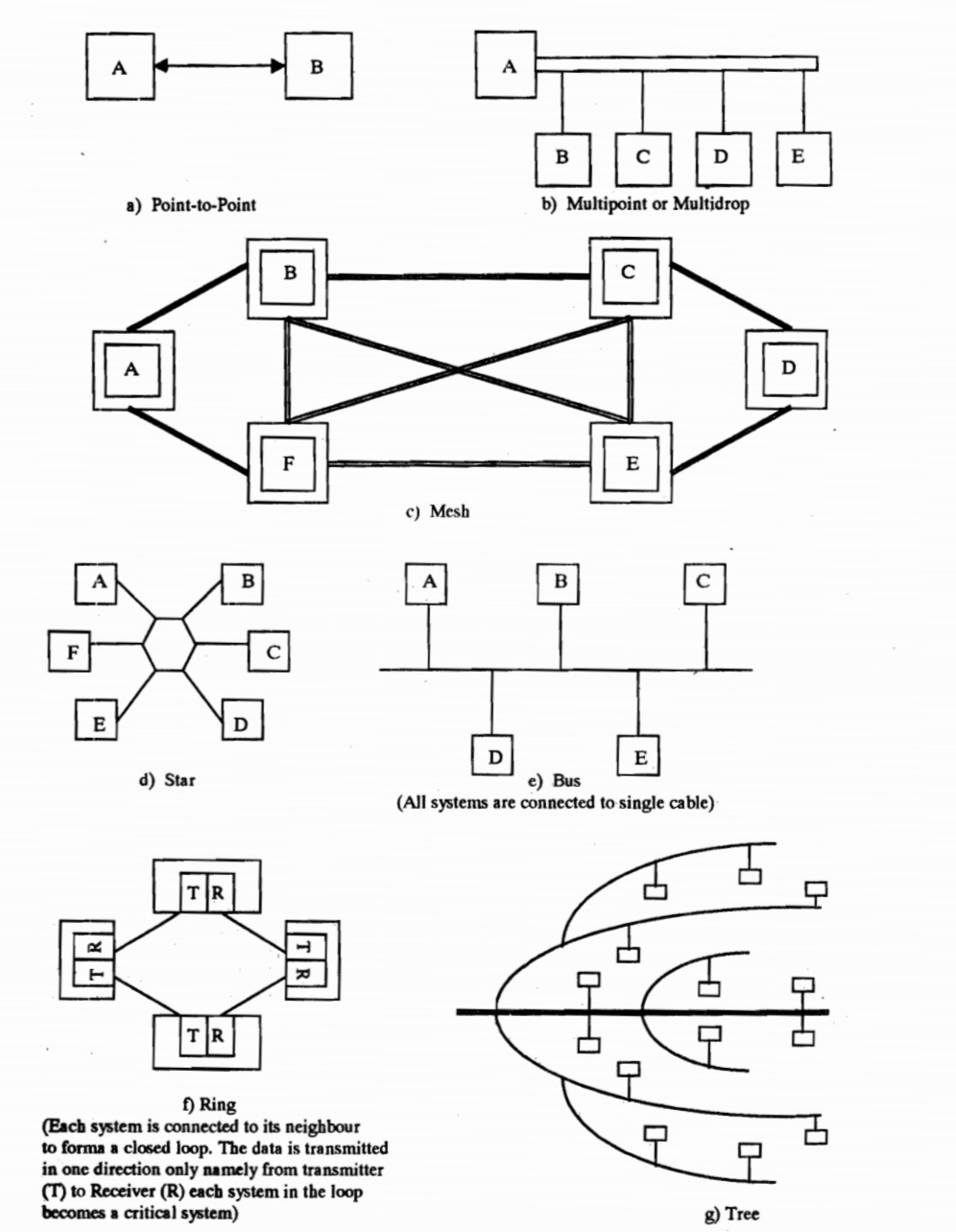
1. Point-to-point
The simplest topology with a dedicated link between two endpoints. Easiest to understand, of the variations of point-to-point topology, is a point-to-point communication channel that appears, to the user, to be permanently associated with the two endpoints. A child’s tin can telephone is one example of a physical dedicated channel.Using circuit-switching or packet-switching technologies, a point-to-point circuit can be set up dynamically and dropped when no longer needed. Switched point-to-point topologies are the basic model of conventional telephony.
2. Multipoint Topology
More than two specific devices share a single link. Multipoint topology is based on “sharing”. In this type of topology, each node on a network has only one connection.3. Mesh Topology
A Mesh topology in which the infrastructure nodes (i.e. bridges, switches, and other infrastructure devices) connect directly, dynamically and non-hierarchically to as many other nodes as possible and cooperate with one another to efficiently route data from/to clients. This lack of dependency on one node allows for every node to participate in the relay of information. Mesh networks dynamically self-organize and self-configure, which can reduce installation overhead. The ability to self-configure enables dynamic distribution of workloads, particularly in the event a few nodes should fail. This in turn contributes to fault-tolerance and reduced maintenance costs.The value of fully meshed networks is proportional to the exponent of the number of subscribers, assuming that communicating groups of any two endpoints, up to and including all the endpoints.
4. Star Topology
In star topology, every peripheral node (computer workstation or any other peripheral) is connected to a central node called a hub or switch. The hub is the server and the peripherals are the clients. The network does not necessarily have to resemble a star to be classified as a star network, but all of the peripheral nodes on the network must be connected to one central hub. All traffic that traverses the network passes through the central hub, which acts as a signal repeater.The star topology is considered the easiest topology to design and implement. One advantage of the star topology is the simplicity of adding additional nodes. The primary disadvantage of the star topology is that the hub represents a single point of failure. Also, since all peripheral communication must flow through the central hub, the aggregate central bandwidth forms a network bottleneck for large clusters.
5. Bus Topology
In local area networks using bus topology, each node is connected by interface connectors to a single central cable. This is the ‘bus’, also referred to as the backbone, or trunk) – all data transmitted between nodes in the network is transmitted over this common transmission medium and is able to be received by all nodes in the network simultaneously.A signal containing the address of the intended receiving machine travels from a source machine in both directions to all machines connected to the bus until it finds the intended recipient, which then accepts the data. If the machine address does not match the intended address for the data, the data portion of the signal is ignored. Since the bus topology consists of only one wire it is less expensive to implement than other topologies, but the savings are offset by the higher cost of managing the network. Additionally, since the network is dependent on the single cable, it can be the single point of failure of the network. In this topology data being transferred may be accessed by any node.
6. Ring Topology
A ring topology is a bus topology in a closed loop. Data travels around the ring in one direction. When one node sends data to another, the data passes through each intermediate node on the ring until it reaches its destination. The intermediate nodes repeat (re transmit) the data to keep the signal strong.[5] Every node is a peer; there is no hierarchical relationship of clients and servers. If one node is unable to re transmit data, it severs communication between the nodes before and after it in the bus.Advantages:
• When the load on the network increases, its performance is better than bus topology.
• There is no need of network server to control the connectivity between workstations.
7. Tree Topology
The tree topology structure gets its name from how the central node functions as a sort of trunk for the network, with nodes extending outward in a branch-like fashion. However, where each node in a star topology is directly connected to the central hub, a tree topology has a parent-child hierarchy to how the nodes are connected. Those connected to the central hub are connected linearly to other nodes, so two connected nodes only share one mutual connection. Because the tree topology structure is both extremely flexible and scalable, it’s often used for wide area networks to support many spread-out devices.Q.5. Write short notes on the of the following: (2×10=20)
a. Barriers to information
A variety of obstacles are hindering the free flow and use of information and knowledge. Some of these barriers are deliberate and hence do not appear within easy means.The barriers to communication and information flow are of the following kinds-
Group 1
While language is a powerful means of communication, the barriers caused by jargons and levels of presentation fail to convey the message intended to be communicated.• Language
Man-man, Man-machine
• Jargon
Neologism, Synonym, Acronym
• Presentation
Level, Style, Form
Group 2
Cultural and Social differentiation may cause serious problems of communication. These problems may be overcome by appropriate presentation of information.• Communication Problem
Multiplicity of Sources, Seepage and Scatter
• Media Problem
Comprehension, Perception, Alien of Reality Misunderstanding
• Socio-economic Problem
Culture ,Level of Development of Countries
Group 3
In this group, the problems posed are volume, misinformation and delays in publication due to various reasons.• Over Population
Primary Papers, Rehash, Abstracts, Digests, etc.
• Pollution (Noise)
Propaganda, Redundant Data, Error
• Delays in Handling
Publication, Postal Transit, Translation, Processing, Searching, Accessing, Document Delivery, Feedback
Group 4
This group of barriers indicates the problem of costs, political situation in a country and other regulatory measures of a country.• Economic
Direct Cost, Overheads
• Political
Instability, War
• Regulatory
Foreign Exchange, Customs
Some of these barriers can possibly be overcome with the instrument of information policies at national levels and the establishment of the International Information and Communication Order.
b. Advantages of computerisation
The advantages associated with computer-based managerial decision-making can be the following :1. Response time is greatly reduced
2. Very large data are stored for information and decision-making
3. Accuracy of information is considerably improved, thereby improving the quality of the decision
4. Problems are handled more easily by using various operation research models
5. The cost involved in the decision-making process is reduced
6. More secrecy is observed as compared to manual file system
7. Ability to take quick decision improves considerably as the time for retrieval of information is very fast
8. Paper work is reduced to the minimum as all the information is stored in the computer itself
9. Lots of information are stored for future reference
10. Chances of leakage of classified information are reduced
11. Accuracy in manipulation is increased very much
12. Time spent in various decision-making activities is reduced to a minimum.
Emanating from the above, the following benefits for a hotels organisation can be attributed to computerisation :
1. The availability of accurate forecasts within 1 per cent of net income
2. The preparation of short-term profit plans and long-term projections
3. The provision of pre-plan information in budget preparation
4. The calculation of variances between budgeted and actual results
5. The triggering of revised forecasts if not proceeding in accordance with plans
6. The early warning system for monitoring activities and the signalling of necessary reactive plans
7. The indication of income and cash flow by following alternate investment strategies
8. The assistance to the planning of new facilities and a host of special strides
9. The accomplishment of the preceding items at a great speed.
Q.6. Explain the role of MIS at various management levels with suitable examples from the hospitality industry. (20)
Management information systems as the study of information systems in business and management. The term management information systems (MIS) also designates a specific category of information systems serving management-level functions. Management information systems (MIS) serve the management level of the organization, providing managers with reports and often online access to the organization’s current performance and historical records. Typically, MIS are oriented almost exclusively to internal, not environmental or external, events. MIS primarily serve the functions of planning, controlling, and decision making at the management level. Generally, they depend on underlying transaction processing systems for their data.MIS summarize and report on the company’s basic operations. The basic transaction data from TPS are compressed and are usually presented in long reports that are produced on a regular schedule. A typical MIS transforms transaction level data from inventory, production, and accounting into MIS files that are used to provide managers with reports.
The important roles of the MIS
1. The MIS satisfies the diverse needs through variety of systems such as query system, analysis system, modeling system and decision support system.
2. The MIS helps in strategic planning, management control, operational control and transaction processing. The MIS helps in the clerical personal in the transaction processing and answers the queries on the data pertaining to the transaction, the status of a particular record and reference on a variety of documents.
3. The MIS helps the junior management personnel by providing the operational data for planning, scheduling and control , and helps them further in decision-making at the operation level to correct an out of control situation.
4. The MIS helps the middle management in short term planning, target setting and controlling the business functions. It is supported by the use of the management tools of planning and control.
5. The MIS helps the top level management in goal setting, strategic planning and evolving the business plans and their implementation.
6. The MIS plays the role of information generation, communication, problem identification and helps in the process of decision-making. The MIS, therefore, plays a vital role in the management, administration and operation of an organization.
Three main categories of information systems serve different organizational levels: operational-level systems, management-level systems, and strategic-level systems.

Operational-level systems support operational managers by keeping track of the elementary activities and transactions of the organization, such as sales, receipts, cash deposits, payroll, credit decisions, and the flow of materials in a factory. The principal purpose of systems at this level is to answer routine questions and to track the flow of transactions through the organization.
Examples of operational-level systems include a system to record bank deposits from automatic teller machines or one that tracks the number of hours worked each day by employees on a factory floor.
Management-level systems serve the monitoring, controlling, decision-making, and administrative activities of middle managers. Management-level systems typically provide periodic reports rather than instant information on operations.
An example is a relocation control system that reports on the total moving, house-hunting, and home financing costs for employees in all company divisions, noting wherever actual costs exceed budgets.
Some management-level systems support nonroutine decision making. They tend to focus on less-structured decisions for which information requirements are not always clear.
Strategic-level systems help senior management tackle and address strategic issues and long-term trends, both in the firm and in the external environment. Their principal concern is matching changes in the external environment with existing organizational capability.
Q.7. Discuss the role and importance of Internet in the Hospitality Industry. (20)
The Tourism and Hospitality Industry has been one of the earliest industries using Integrated Marketing Communication to promote their products and services. Internet plays a big role in their strategy since it has been covered to every corner of the world. Because the Hospitality industry mostly provides intangible products, such as services and comfort, the internet has become a good way to deliver their messages, in touch with customers and promote their branding.
Internet can be maximum exploited in the tourism industry for different types of marketing or promotional activities. Internet helps the tourism industry to expand and transfer its data which helps the industry to increase the turnover ratio and internet is the most suitable way to make direct relationship with customers. Tourism industry can achieve many advantages if internet is used wisely.
Since internet connection is a wide communication network, tourism agencies can make a direct relation with the public. Product distribution and services of agencies cannot depend on quantity of printed papers anymore and information about them can reach millions of the internet users.
Advantages of using internet in Tourism industry
1. In the modern world travel agencies can use internet as a profitable medium of tourism promotion and sales.
2. Good quality of promotional visualization of tourism services and products through internet can create a better impression in the people than brochures and catalogues.
3. The internet represents an efficient and useful distribution channel for collecting clients and it helps to identify their desires.
4. Internet allows the improvement of efficiency of travel agencies by speeding up communication and providing all the necessary information.
5. Contemporary business in tourism market is characterized by the implementation of various booking systems in to business systems of travel agencies, hotel chains, airlines etc.
6. The internet allows high quality and effective market research and industrial espionage.
7. By the entry of internet in tourism industry promotional tools such as TV, radio, newspapers, catalogs and posters are improved to text, drawings, photographs or 3D photographs etc.
8. Unlimited database and unlimited capacity of digital media allows instant access to the tourist market free products to every potential tourist.
At the mean time, internet also created some difficulties among the industry.
For example, hotels are fighting back to the third party booking sites. Internet has provided travelers some easier ways to find and reserve flights and hotel rooms during their traveling plans, such as Kayak, Orbitz and Expedia. Hotels has been living with these for a long time.
As a result, third party booking sites are not exactly what tourism and hospitality industry are trying to develop in their Integrated Marketing Communication strategies. One of the problems is that a hotel won’t be able to collect their own information from travels.
In order to get the power back, many hotel chains offer many benefits to attract customers to book directly through them, such as free Wi-Fi, breakfast and upgrade and membership rewords, etc.
There are some benefits if hotel industry win this game: first, Have direct communication with customers, which can help them update their inside customer information up-to-date. Second, build a better customer loyalty.
Q.8. What is a computer virus ? What are the preventive measures and treatment for virus attack? (20)
Computer virus is a software code that can infect other computer programmes by altering them to include a copy of itself. It is not a biological virus. Though non-living and artificially created, the computer virus still has certain analogies to its biological counterparts. These are :• The biological virus has specific coded strains while each computer virus has specific signatures.
• Both invade and replicate only in the host. The biological virus replicates in human or living organisms, the computer virus replicates in computer programmes, thus, expanding its influence progressively.
• The patient or host infected by either virus show a set of symptoms or effect. Thus, after detecting the symptoms vaccine for the diagnosed virus can be prepared.
The main characteristics of computer virus are:
1. Making replicas
A virus can copy itself into another place, file or another disk. Typically, if a disk carrying a virus is put into a computer, the virus can get loaded into the machine through Random Access Memory (RAM) and copies itself onto every other disk that is used thereafter. The virus can also propagate a copy of itself through the telephone lines or via network connections. Sometimes a mutated version of the virus may be copied which may be difficult to recognise.2. Autonomous in nature
A virus may run without being explicitly called by the user of the computer. This is possible because the virus may change the starting up procedure on computer such that the code of the virus is executed prior to execution of the code of operating system. Thus, it has a degree of autonomy.3. Malicious activity
A virus can cause lot of damage to the computer system in terms of software and data:• it may cause loss of data,
• it may overwrite some of the important files with unrecognised characters,
• it may modify programmes or software making them unusable,
• it may scramble your database or Word Processor file resulting in incorrect information,
• it may not allow the system to start at all,
• some special effects on screen like falling of characters or bouncing balls may be produced, and
• it may display messages or graphics on the screen such as Happy Birthday, Give me a Cookie, your PC is stoned, etc.
It is usually believed that viruses cannot damage the hardware. However, there could be situations when it can damage the moving parts. A virus can produce a sequence of sector Read/Write instruction which can be thrust on one’s terminal causing a hard disk motor and IC working for very long duration with a lot of head movement.
4. Avoid detection
A virus may take steps to avoid a detection. An active virus is difficult to recognise as it can hide itself from the scanning programme through showing a mutated version of itself.Preventive Measures
We must observe the following precautions while working with computers to protect from perverse software.
1. Keep ‘Write protect” tabs on all your system disks. If possible/available, go for virus protection software/ hardware.
2. Do not use illegitimate copies of software.
3. Don’t accept free software that looks too good to be true. Buy software only from proven source. Accept the software which is shrink wrapped or securely contained or scaled.
4. Provide physical security for your computers i.e. Locked rooms, locks on the computers etc. Log-out while leaving terminal/ system.
5. Do not use external floppy disks. If you are unsure of a floppy disk or a specific program, run it in an isolated environment where it will not be able to do any damage or scan the floppy before using it.
6. Avoid swapping floppies across machines..
7. Avoid Booting from many floppies, in case your system does not have a hard disk.
8. Check all floppy disks periodically and remove infected programs immediately.
9. Change your passwords frequently.
10. Establish a sound Back-up policy. Make sure you can have at least three sets of back-up disks that you can rotate through a regular cycle of use.
11. Prevent access to unauthorised users.
12. Make all the programmers/ users aware of the security procedures and carry out surprise regular checks.
13. Maintain registers for having a strict control on software, data and program acquisition.
Treatment
There are various ways by which virus can be removed. Some of them are given below:1. Writing another virus which replicates and kills the harmful virus.
2. Using anti-virus software available in market. Some of the anti-virus software are memory resident and can be put in “AUTOEXEC. BAT” so that they become functional soon after the computer is switched on. When it detects the presence of offending code, the computer is locked and a warning message is flashed on the screen. Afterwards software proceeds to eliminate the virus from the computer by overwriting on the offending parts.
Some of examples anti-viral programs are given below:
a. Vaccine : It enables the computer’s operating system to detect alterations to the code of system files and applications.
b. Data Physician : It detects and in some cases removes the virus. Also, it creates a list of computer data files, which are protected and watches them while computer is in operation.
c. Daystar Vaccine : It is designed to do the task of either clearing RAM or finding an uncontaminated system.
d. Apple Antidote : It detects virus by searching the offending code. The antidote becomes functional immediately after the computer is switched on. When it detects rogue code, the computer is locked and a warning message is flashed on the screen. Then, it eliminates the virus from computer by overwriting on the offending parts created by the virus.
e. DPROTECT : With this, a floppy or hard disk can be made write protected internally, thus not allowing writing on it. Write Protect remains as long as ‘DPROTECT” is not nullified, by rebooting the system.
But besides all these softwares, the anti-viral softwares still lag behind the virus development. Therefore, these softwares may not succeed. In such cases, you have to follow other methods.
3. Switch off the system. Boot from A: drive by using uninfected floppy. Attempt to overwrite the Boot-sector using special programs. This procedure is successful in some cases. The other method is to erase the boot record with zeros and then replace it using certain utilities.
4. Another procedure is to search the entire disk, sector by sector, until the virus program segment is located. Then write original boot record over the virus shoe record and erase the infected program segment.
5. One of the common techniques is to search only those sectors marked as bad by FAT (File Allocation Table) and then remove the bad sectors.
6. Executable Files Infection : Remove all the infected files. Replace them from the original distribution diskettes.
7. If none of the above method works, then do the ultimate, i.e. Low Level Formatting. Switch off the system. Boot from A: drive by using uninfected floppy. Backup all the files and data from hard-disk to floppy disks. Now perform low-level formatting with the help of standard software or debug command. (For debug command, kindly refer to your system manual.) And then, reload the data only after testing it thoroughly for virus on an isolated PC.
Q.9. Discuss the legal aspects related to the purchase and sale of computers. (20)
Computer technology being relatively new to developing countries like India, the consumer is rarely aware of even the fundamentals of computers. Also consumerism is still very weak in developing countries. As a result the sellers dump their products on the consumer. The customer often buys a computer as children buy toys. Most consumers buy without knowing what they actually want to do with the computer or whether the computer which they are buying will really suit their specific requirements. The situation is true both of individuals and organisations. In many cases the computers remain merely as show pieces after purchase and are often used for playing games.A. Purchase/Sale – A Contract
Every purchase of any movable article is a contract covered by the provisions of a branch of contract law known as sale of goods. In India, for example, sale of goods is governed by the provisions of the Sale of Goods Act 1897.
1. Off-the-Shelf Purchase
Sale or purchase of goods can be broadly of two types, one in which a specific product with specified features is offered by a seller. Here the seller fully discloses all the features of the merchandise to the buyer through literature in the form of pamphlets, manuals, etc. The buyer may buy with or without inspection relying upon the specifications disclosed. Here the buyer buys a product with full knowledge of what it can accomplish, provided the equipment works according to the features offered. In such a deal the buyer cannot complain later that the equipment purchased did not fulfil the requirements.2. Purchase based on Buyer’s Specifications
In it the buyer specifies the actual requirements and relies upon the seller to give an equipment that will meet the actual requirements. In such cases, the buyer, if the equipment fails to suit purpose, can proceed against the seller and claim a replacement or damages. Suppose a buyer explained to a seller that he or she wanted a grinder to grind wet cereals and relied upon the seller to choose an equipment and later found that the grinder which was sold will only grind dry, then he or she can compel the seller to give a replacement that will grind wet or if this is not possible claim damages or refund.3. Compatibility with Peripherals etc.
Compatibility with peripherals like printers, communication equipment like fax, telex, digital camera, scanner, etc. also are better specified in advance, so that if the buyer wants to link the computer with such facilities later, he or she may not end up with problems. In situations where the buyer is already having one system and is trying to upgrade it or expand it, the compatibility aspect will be all the more important. It is generally claimed that hard disks can be added to an ordinary P.C. quite easily, but when it comes to actual application many suppliers try to wriggle out of this type of upgrading.4. After Sales Service
Still another area where the buyer is advised to specify clearly is the after sales service facilities. Computer is after all a piece of equipment and would need frequent servicing. In the current Indian scene third party maintenance is yet to pick up and therefore after sales service in the form of annual maintenance contracts or other type of periodical maintenance on actual cost basis etc. have to be specified by the buyer.5. Compatibility with Software
Compatibility with software as also the purchase of software are two aspects which deserve much attention and specification by the buyer. The usual sales talk as well as computer advertisements try to lure buyers to invest on hardware as if software is something which is automatically available with hardware (of course this would never be specifically mentioned). The demonstrations of the product are also usually so organised that the unknowing buyer is led to believe that once he or she buys the hardware he or she has only to take it home and hook on to the plug for getting the outputs.6. Networking
Still another aspect of hardware purchasing deals with incorporation of specifications for networking of computers. Not all makes and all types of computer can be networked. Further both additional hardware and software are required to do networking. If one hopes to do networking later then one should specify at the time of purchase of the computer system that he or she wants a model which will enable networking at a later date.7. Inspection Before Purchase
It is one of the basic principles of the law of sale of goods that when a buyer has purchased after inspection of a sample, the goods delivered should conform to the sample, failing which the buyer can proceed against the seller. However, this is a double-edged sword for the seller may also try to take advantage of the position what one is bound to provide are only such features as were incorporated in the sample. When inspection of the sample is not thorough the buyer will suffer.8. Conditions, Guarantees and Warranties
When a computer such as say a P.C. is guaranteed for performance for one year (may be subject to certain conditions such as that in case of a problem the supplier or the authorised agent only shall attend to repairs, etc.) then if the equipment fails within the guarantee period the supplier is bound to make it work at his or her cost either by repairs or replacement. Warranties, on the other hand relate to the features of the equipment which are not so vital to the performance of the equipment. Hence, they do not attract the same consequences. The seller can choose to repair the shortfalls or agree to pay damages.B. Purchase/Sale of Software
Software is the brain of the computer. Without the relevant software even the most powerful computer cannot accomplish anything.
There are two types of software, the system software and the application software. Without the system software such as the Disk Operating System or the Unix or other types the user cannot proceed to use the computer at all. Even many a reputed manufacturer/supplier keeps the price of operating system extra and project the price of the hardware low. During demonstrations the suppliers demonstrate the capabilities of the computer using several sophisticated application softwares and the ignorant buyer may believe that all those are part of the hardware.
Another form of software purchase is when the buyer contracts with the supplier of the equipment to provide tailor-made software for the specific needs of the buyer. This is the usual practice in the case of organisations. The supplier has then to do systems analysis and develop application programmes to suit the needs of the buyer. In some cases it may be that the customer has some software and needs a system which will enable him or her to use the software. This often happens with professionals who go abroad and bring software which they find attractive.
Q.10. Write short notes on any two of the following : (2×10=20)
a. Classification of computers
In the 1970s computers were classified into three categories, namely, super computers, large computers and mini computers. But the invention of the micro-processor which gave birth to micro-computers in the late 70s drastically changed the computing scene. A wide range of computers are available today in the market ranging from a personal computer to a super computer.1. A personal computer (PC)
It is a micro-computer which has its entire central processing unit on a single micro-processor chip. A PC provides a main memory capacity upto 640 kilo bytes and a processing power of 0.5 MIPS. It supports one or 2 diskette drives of 360 KB each for random access secondary memory. A PC usually comes with a standard keyboard, a visual display unit and a dot matrix printer. A PC is usually operated by a single user and not suitable for applications requiring very large storage capacities. PCs are commonly used for word processing, desktop publishing, accounting and so on.2. A super micro-computer
It has its entire central processing unit on a very powerful micro-processor, provides a main memory capacity of upto 16 mega bytes, has a processing power of 2 to 3 MIPS, supports winchester disks of capacity 20 to 80 mega bytes and allows simultaneously access to multiple users. Today’s super micro is actually replacing yesterday’s mini computers which provide almost the same computing power if not less, but based on a different technology. They are used to control and monitor production processes, analyse results in laboratory experiments among other things. They are also used as servers in LAN (Local Area Network).3. A large computer
It provides a main memory capacity of upto 32 mega bytes, a processing power of MIPS and supports a large number of disks and tapes. Disk capacities range from 100 MB to 1000 MB. It also allows simultaneous access to multiple users and supports a large number of input and output devices. It is also known as mainframe computer. They operate at very high speed and are used for processing large amount of data. They are also used as controlling node in WAN (Wide Area Network).4. A super computer
It is the largest computer system available in the market. It provides a main memory capacity of upto 64 mega bytes and a processing speed of 20 MIPS. It also supports a large number of disks and tapes of enormous capacity for providing random access and serial access secondary memory. A super computer also allows multiple users to interact with the CPU simultaneously through multiple types of input devices. It also provides outputs in a variety of output devices. Super computers are not easily available as only a very few organisations can afford them. These computers are used for weather forecasting, weapon 11designing and so on.Most commonly used computers are the PCs (Personal Computers). Personal computers are used by managers for their own computing needs. Availability of a large number of user-friendly software packages on PCs have made them effective tool to support managerial decision-making. PCs have also encouraged distributed data processing. A super, micro or mini computer is used for commercial data processing and managerial applications. A large or mainframe computer is necessary for very large data processing and data management applications. A super computer is primarily used for highly scientific and research purposes.
b. System Lifecycle
The various stages in the System life cycle of a CBIS are –1. Objectives and Feasibility
The first and the most important step is to provide a broad statement of organisational objectives, for the proposed CBIS. This is primarily a responsibility of the top management, since this Information System is expected to help the organisation and the management in the discharge of their function. The Information Systems development effort begins by understanding the organisations objectives, for these are required to be translated to constitute the objectives of the Information System.The next step is to examine the feasibility of the proposed system. This involves considering various broad alternatives, such as, valuating the costs and benefits of the system. Initially a rough cost-benefit analysis will be sufficient for the top management to take a decision either in favour of or against the proposed CBIS.
2. System Analysis
Systems Analysis is the next stage in the life cycle of a CBIS. The system analysis includes review of the existing procedures and information flow. Decision-making and individual information needs at various levels in different functional areas are also reviewed. The system analysis phase primarily focuses on isolation of deficiencies from the existing system.The fundamental activities involved in the system analysis are:
• Definition of the overall system,
• Separation of the system into smaller and manageable parts, and
• Understanding the nature, functions and interrelationships of various subsystems.
Systems Analysis involves teamwork and a considerable amount of time. A clearer picture of costs and benefits of alternative approaches will emerge from a detailed study of the proposed system. Involvement of ultimate users of CBIS is very crucial at this stage itself, so that the acceptance of CBIS upon implementation will be relatively easy.
3. System Design (Logical)
The Logical System Design phase defines the way things should be for the same problem. The system development phase includes mapping of the business requirements of the managers on to the proposed system. The conceptual design for the model which has been developed in the problem definition stage is enlarged to understand the actual flow of data and the logical model is developed. The logical model is worked out to finally develop and test the physical system in the system development phase.
A logical representation of data flow analysis and data processing analysis in a CBIS can be effectively provided through structured system design tools. These are:
a. Data Flow Diagram
A Data Flow Diagram (DFD) is a graphical representation to depict the flow of data in a CBIS. It should be realised that a DFD provides only a logical data flow and not a physical data flow.b. Data Dictionary for Data Flow Analysis
A Data Dictionary (DD) is intended to provide a complete documentation of all the elements of a Data Flow Diagram, namely data items, data stores, and data flows.c. Decision Tables
A decision table displays and documents clearly the processing logic for each processing step identified in a DFD.d. Decision Trees
A decision tree is another way to document processing logic, specially when the number of alternatives is not too many. Combination of conditions are represented along the branches of a decision tree. The outcome of each of these combinations is given at the end of the final branch.4. System Design (Physical)
While a logical design provides an estimate of processing requirements, a physical design involves mapping the logical design onto the physical hardware of a computer system. Upgrading the existing hardware and/or acquiring a new computer system if required to meet the processing requirements is also undertaken at this stage.The system analysts assign specific responsibilities to the programmers who develop and test the programmes.
5. Implementation
Once the system has been declared fully developed and tested by the development team, it is ready for implementation. Actual programming is undertaken at this stage to implement the proposed CBIS in the available hardware. The involvement of the user is necessary throughout the project duration, but the user involvement is critical during this phase.The implementation includes the following activities:
• Programme development and planning for implementation,
• Preparing the schedule for implementation,
• Procurement of hardware,
• Installation of software,
• Operation and testing of software on hardware.
6. Maintenance
Though the system is thoroughly tested before the implementation, yet the system is never fool proof and errors always continue to exist. Therefore, there is a need to have a systems person to look after the system and maintain it even during the operation and production.As users develop faith in a CBIS, their demands on the system will grow. The system design should be flexible enough to accommodate future requests, refinements, modifications, and changes to suit users’ requirements. Well documented logical and physical designs of a CBIS will facilitate its maintenance considerably.
c. Electronic Spreadsheet
Electronic Spreadsheet software hailed as the single most important reason for management use of micro-computers. It is doubtful if the business world would be buying micro-computers in the volume that it does if there were no electronic spreadsheet packages. The fundamental idea of value in such packages is the concept of an ‘electronic’ spreadsheet. A spreadsheet is simply a sheet of paper with rows and columns in which one can enter data in the form of numbers and text. A balance sheet is a spreadsheet, a price list is a spreadsheet, in fact most managerial report are spreadsheets. An electronic spreadsheet is like a paper spreadsheet except that:• It is much faster and easier to make modifications to it and to make both electronic and paper copies of it.
• At a given time one can only see a part of the whole sheet. To see parts which are not visible, we need to ‘scroll in’ those parts. It is like seeing the spread sheet through a window.
• In addition to allowing numbers and text it allows formula (such as Contribution = revenue – Variable Cost) to be entered into the worksheet. This enables very rapid recalculation to be done under changed assumptions.
Lotus 1-2-3 is the most popular spreadsheet software package today. The Lotus 1-2-3 spreadsheet (called a worksheet) has rows entered numbered 1,2,3 upto 2048. It has 256 columns – from A, B, C, …, Z through AA, AB, etc. upto IV. Newer versions can handle more rows and columns.
The width of the columns can be different and can be adjusted to suit the application. At any time 20 rows and (typically) 8 columns are visible on the computer-screen. To view other parts of the worksheet, the ‘cursor’ key has to be manipulated. The ‘cursor’ is a bright rectangle of light which is one row by one column in size. By using up, down, left and right arrow keys the cursor can be moved around on the screen.
When the cursor is at the right extreme, pressing the right arrow key will ‘scroll’ the worksheet one column to the right, i.e., the left column(s) will disappear and a new column (the column to the immediate right of the previous right-most visible column) will appear. By repeating this action as often as required, we can move the window to the right. Similarly, by using the other arrow keys, we can move the window left, up and down as well.
Spreadsheet models have a simplicity which makes them natural for users. They also find use in a surprising variety of applications. Although, undoubtedly, their largest use is in financial modelling, they find frequent use in areas like marketing, production, logistics and human resources.