
Table of Contents
Q.1. With the help of a chart classify computers in detail.

On The Basis Of Purpose
General Purpose Computers
These are designed to perform a range of tasks. They have the ability to store numerous programs, but lack in speed and efficiency comparatively.
Special Purpose Computers
Specific purpose computers are designed to handle a specific problem or to perform a specific task. A set of instructions is built into the machine.
On The Basis Of Size
Microcomputers
- Microcomputers are connected to networks of other computers.
- The price of a microcomputer varies from each other depending on the capacity and features of the computer.
- Microcomputers make up the vast majority of computers.
- A single user can interact with this computer at a time.
- It is a small and general-purpose computer.
Mini Computer
- Mini Computer is a small and general-purpose computer.
- It is more expensive than a microcomputer.
- It has more storage capacity and speed.
- It designed to simultaneously handle the needs of multiple users.
Mainframe Computer
- Large computers are called Mainframes.
- Mainframe computers process data at very high rates of speed, measured in the millions of instructions per second.
- They are very expensive than the microcomputer and minicomputers.
- Mainframes are designed for multiple users and process vast amounts of data quickly.
- Examples:- Banks, insurance companies, manufacturers, mail-order companies, and airlines are typical users.
Super Computers
- The largest computers are Super Computers.
- They are the most powerful, the most expensive, and the fastest.
- They are capable of processing trillions of instructions per second.
On The Basis Of Functionality/ Data Handling
Analog Computers
- An Analog Computer is a form of computer that uses continuous physical phenomena such as electrical, hydraulic, or mechanical quantities to model the problem being solved.
- They work on the principles of measuring in which the measurements obtained are translated into data.
- Modern Analog Computers usually employ electrical parameters such as voltages, resistances or currents to represent the quantities being manipulated.
- They measure continuous physical magnitudes
Digital Computers
- A computer that performs calculations and logical operations with quantities represented as digits, usually in the binary number system.
- They process data into a digital value (0s and 1s).
- They give results with more accuracy at a faster rate.
Hybrid Computers
- A combination of computers, those who are capable of inputting and outputting in both digital and analog signals.
- A Hybrid computer system set up offers a cost-effective method of performing complex simulations.
- They incorporate the measuring feature of an analog computer and counting feature of a digital computer.
- For computational purposes, these computers use analog components and store digital memories are used.
Q.2. List the internal and external commands with syntax of MS-DOS.
Internal Commands
Internal Commands are built into the operating system as the part of a file called COMMAND.COM
When you type an Internal Command MS-DOS will perform it immediately. All of the internal commands are part of the shell which could be command.com or cmd.exe (depending on your version of MS-DOS or Windows) and are not separate files on the hard drive. As long as you can open a command line you can run any of the internal commands included with your version of MS-DOS
Example Of Ms-dos Internal Command Are:
- CLS – It is a command that allows you to clear the complete contents of the screen and leave only a prompt.
- BREAK – Break can be used to enable or disable the braking capability of the computer.
- REN – It is used to rename files and directories from the original name to a new name.
- CHDIR – Chdir (change directory) is a command used to switch directories in MS-DOS.
- EXIT – The exit command is used to withdrawal from the currently running application and the MS-DOS session.
- RMDIR – Removes an empty directory in MS-DOS.
- DEL- Del is a command used to delete files from the computer.
- COPY – Allows you to copy one or more files to an alternate location.
- VOL – Displays the volume of information about the designated drive.
- TYPE- Display the contents of a text file.
- DATE – The date command can be used to look at the current date of the computer as well as change the date to an alternate date.
- TIME – Allows the user to view and edit the computer’s time.
- DIR – The dir command displays information about files and directories, and how many spaces available.
- SET – Allows you to change one variable or string to another.
- MKDIR/MD – Allows you to create directories in MS-DOS.
- PATH – Path is used to specify the location where MS-DOS looks when using a command.
- DISKCOMP- Comparing two diskettes.
- DISKCOPY- Copying a diskette.
- RD- Remove a directory.
External Commands
These external commands are for performing advanced tasks and they do need some external file support as they are not stored in COMMAND.COM.There are also Batch commands or Batch files which are text files that contain a list of internal and/or external commands which are executed in sequence when the batch file is executed. AUTOEXEC.BAT gets executed automatically on booting.
Examples of External Commands are:-
- DELTREE- Short for delete tree, deltree is a command used to delete files and directories permanently from the computer.
- TREE- Allows the user to view a listing of files and folders in an easy to read the listing.
- PRINT – The print command allows users to print a text file to a line printer, in the background.
- FIND – Allows you to search for text within a file.
- XCOPY – Xcopy is a powerful version of the copy command with additional features; has the capability of moving files, directories, and even whole drives from one location to another.
- DISK COMP- Compares the contents of a floppy disk in the source drive to the contents of a floppy disk in the target drive.
- FORMAT – Format is used to erase information off of a computer diskette or fixed drive.
- ATTRIB – Attrib allows a user to change the attributes of a file or files.
- SORT- Sorts the input and displays the output to the screen.
- CHKDSK- Chkdsk is a utility that checks the computer’s hard drive status for any cross-linked or any additional errors with the hard drive.
- FORMAT – Format a diskette.
- PRINT – Printing a file.
- MOVE- Allows you to move files or directories from one folder to another, or from one drive to another.
OR
Briefly describe the characteristic features of input and output devices of a computer system.
Input Unit
The input unit is used for transfers’ raw Data and control signals into the information processing system by the user before processing and computation. All the input unit devices provide the instructions and data are transformed into binary codes that are the primary memory acceptable format.
Example of Input unit devices: keyboard, mouse, scanner, joystick, MICR, Punched cards, Punched paper tape, Magnetic tape, etc.
Output Unit
The output unit receives information from the CPU and then delivers it to the external storage or device in the soft or hard processed form. The devices which are used to display output to the user are called output devices. The Monitor or printer is a common output device.
Q.3. Define topology. Explain types of topologies and network applications in detail.
Network Topology
Types of physical topologies
In the bus network topology, every node is connected in series along a linear path. This arrangement is found today primarily in cable broadband distribution networks.
In the star network topology, a central node has a direct connection to all other nodes. Switched local-area networks (LANs) based on Ethernet switches, including most wired home and office networks, have a physical star topology.
In the ring network topology, the nodes are connected in a closed-loop configuration. Some rings will pass data only in one direction, while others are capable of transmission in both directions. These bidirectional ring networks are more resilient than bus networks because traffic can reach a node by moving in either direction. Metro networks based on Synchronous Optical Network Technology (SONET) are the primary example of ring networks today.
The mesh network topology links nodes with connections so that multiple paths between at least some points of the network are available. A network is said to have fully meshed if all nodes are directly connected to all other nodes and partially meshed if only some nodes have multiple connections to others. Meshing to create multiple paths increases resiliency under failure, but increases cost. The Internet is a mesh network.
The tree network topology, also called a star of stars, is a network where star topologies are themselves connected in a star configuration. Many larger Ethernet switch networks including data center networks are configured as trees
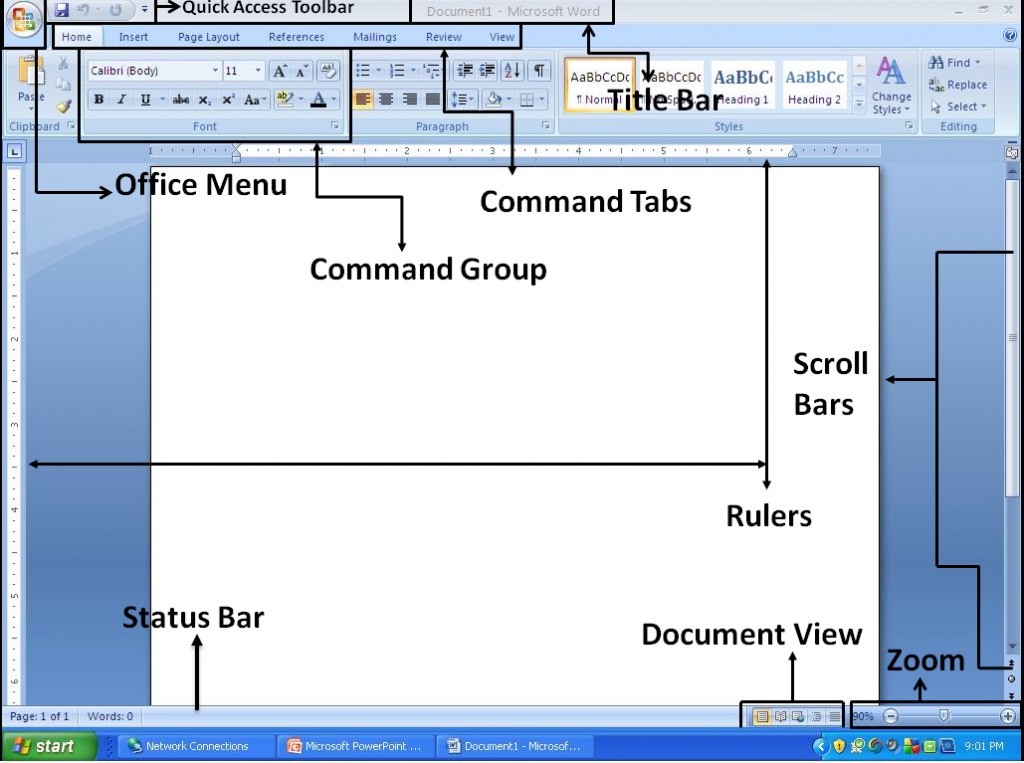
Q.4. Draw the MS-Word Window Screen Label and write about the parts of MS-Word Window.
OR
What do you mean by Data Communication Channels? Discuss different channels with their features.
A communication channel refers either to a physical transmission medium such as a wire, or to a logical connection over a multiplexed medium such as a radio channel in telecommunications and computer networking. … Cable or wire line media use physical wires of cables to transmit data and information.
A Data Communication Channel can take many forms, including ones suitable for storage which can communicate a message over time as well as space. A connection between initiating and terminating nodes of a circuit. A single path provided by a transmission medium via either physical separation, such as by multi-pair cable.
Types of Channel
Fiber optic “cable”
Coaxial Cable Types
Twisted Pair
Fiber optic cable
- Speed: Fiber optic networks operate at high speeds – up into the gigabits
- Bandwidth: large carrying capacity
- Distance: Signals can be transmitted further without needing to be “refreshed” or strengthened.
- Resistance: Greater resistance to electromagnetic noise such as radios, motors or other nearby cables.
- Maintenance: Fiber optic cables cost much less to maintain.
Coaxial Cable
Coaxial cable, or coax, is a cable consisting of an inner conductor, surrounded by a tubular insulating layer
typically made from a flexible material, all of which is then surrounded by another conductive layer and then finally covered again with a thin insulating layer on the outside.
The Coaxial cable is used as a transmission line for radio frequency signals, in applications such as connecting radio transmitters and receivers with their antennas, carrying internet connections, and distributing cable television.
Twisted Pair
A type of cable made by intertwining two separate insulated wires together. There are two types of twisted pair: shielded and unshielded. Shielded Twisted Pair (STP) has a fine wire mesh surrounding the wires to protect the transmission;
Unshielded Twisted Pair (UTP) does not. Shielded cable is used in older telephone networks, networks, and data communications to reduce outside interference.
Q.5. Distinguish between:
(a) Interpreter and Compiler
| INTERPRETER | COMPILER |
| It translates the program line by line, | It assembles the whole program. |
| The debugging process is easy. | The debugging process is complex as it generates errors only at the end of the compilation. |
| The object code of the statement produced by the interpreter is not saved. | The object code produced by the compiler is permanently saved for future reference. |
| It is a smaller program compared to a compiler. Thus, it occupies lesser memory space and has a lower execution time. | It is a complicated process compared to an interpreter. Thus, it has a higher execution time and occupies larger memory space. |
| It is a slow process. | It is 5-25 times faster than an interpreter. |
| It is used in the FORTRAN program. | It is used in C language program. |
(b) System software and Application software
Definition |
System Software is the type of software which is the interface between application software and system. |
On other hand Application Software is the type of software which runs as per user request. It runs on the platform which is provide by system software. |
|
Development Language |
In general System software are developed in low level language which is more compatible with the system hardware in order to interact with. |
While in case of Application software high level language is used for their development as they are developed as some specific purpose software. |
|
Usage |
System software is used for operating computer hardware. |
On other hand Application software is used by user to perform specific task. |
|
Installation |
System software are installed on the computer when operating system is installed. |
On other hand Application software are installed according to user’s requirements. |
|
User interaction |
As mentioned in above points system software are specific to system hardware so less or no user interaction available in case of system software. |
On other hand in application software user can interacts with it as user interface is available in this case. |
|
Dependency |
System software can run independently. It provides platform for running application software. |
On other hand in application software can’t run independently. They can’t run without the presence of system software.. |
|
Examples |
Some examples of system software’s are compiler, assembler, debugger, driver, etc. |
On other hand some examples of application software’s are word processor, web browser, media player, etc. |
(c) Primary storages and Secondary storages

(d) MAN and WAN
| S.NO | MAN | WAN |
|---|---|---|
| 1. | MAN stands for Metropolitan Area Network. | WAN stands for Wide area network. |
| 2. | MAN might not be owned by one organization. | While WAN also might not be owned by one organization. |
| 3. | There is moderate propagation delay in MAN. | Whereas there is long propagation delay. |
| 4. | The transmission speed of MAN is faster than WAN. | While the transmission speed of WAN is low. |
| 5. | MAN’s design and maintenance is difficult than LAN. | While WAN’s design and maintenance is also difficult than LAN as well MAN. |
| 6. | There is less noise and error in MAN in comparison of WAN. | While there is more noise and error in WAN than LAN and MAN. |
| 7. | MAN covers more area than LAN but less than WAN. | While WAN covers very huge area than LAN and MAN. |
| 8. | MAN supports moderate bandwidth for transfer of data. | WAN supports a bandwidth of low range. |
| 9. | Cost of installation of MAN is moderate. | Cost of installation is very high as compared to LAN and MAN. |
(e) Hardware and Software
| HARDWARE | SOFTWARE |
|---|---|
| Hardware is a physical parts computer that cause processing of data. | Software is a set of instruction that tells a computer exactly what to do. |
| It is manufactured. | It is developed and engineered. |
| Hardware can not perform any task without software. | software can not be executed without hardware. |
| As Hardware are physical electronic devices, we can see and touch hardware. | We can see and also use the software but can’t actually touch them. |
| It has four main categories: input device, output devices, storage, and internal components. | It is mainly divided into System software, Programming software and Application software. |
| Hardware is not affected by computer viruses. | Software is affected by computer viruses. |
| It can not be transferred from one place to another electrically through network. | But, it can be transferred. |
| If hardware is damaged, it is replaced with new one. | If software is damaged, its backup copy can be reinstalled. |
| Ex: Keyboard, Mouse, Monitor, Printer, CPU, Hard disk, RAM, ROM etc. | Ex: Ms Word, Excel, Power Point, Photoshop, MySQL etc. |
Q.6. Expand the following (any five):
(a) BIOS : basic input output systems
(b) HTTP : hyper text transfer protocol
(c) BASIC : beginners all-purpose symbolic instruction code
(d) FORTRAN : Formula Translation
(e) ALU : arithmetic logic unit
(f) MODEM : Modulator-Demodulator
(g) EPROM : Erasable Programmable Read-Only Memory
(h) URL : Uniform Resource Locator
Q.7. A Fill in the blanks:
(a) MS DOS is a command based Prompt System.
(b) A translator is a System Software.
(c) Supercomputers support 10,000 terminals at a time.
(d) High level languages can be translated into machine code by Compiler.
(e) Personal computers are also called PC
B State True or False:
(i) Memory of a computer is a part of hardware. True
(ii) Electric pen is an output device. False
(iii) GUI means Graphical User Interface. True
(iv) Each high level language requires its own translator. False
(v) NIC stands for Normal Interface Cards. False