
Commulative simply means Increasing or enlarging by successive addition.
The origin of cumulative is helpful in remembering the meaning; it comes from the Latin cumulatus for “to heap.” If something is cumulative, it is heaped together so it can be counted up to get a total number.
To understand it better consider following example:
Cumulative Cost Records
The easiest way to keep track of daily food costs is to use a form like the one shown in Figure. On this form, the cost of direct supplies, the cost of stores, total costs today, cumulative cost for the month, sales for the day, cumulative sales for the month, cost percentages for the day, and cost percentages for the month can be entered. Note that the form does not take into account transfers.
Some POS systems have this feature and can be used to track daily food costs.
Date |
Stores |
Directs |
Cost Today |
Cost to Date |
Sales Today |
Sales to Date |
Cost % Today |
Cost % to Date |
Daily cumulative food cost record
A new form is started each month. Nothing is carried forward from month to month. The month-end totals should be close to the figures obtained using other monthly food cost procedures, such as those calculated after doing a physical inventory.
The information needed to fill in the food cost record are the daily food purchase reports for direct costs, copies of requisitions for stores, and the daily sales figures.
The following example explains how to fill out the form.
Example
On the first day of the month, $35.00 was spent on directs, $102.00 on stores, and total sales were $360.00. On the second day of the month, $12.50 was spent on directs, $95.00 on stores, and sales were $345.00. On the third day, $30.00 was spent on directs, $99.50 on stores, and total sales for the day were $310.50.
- On the first day, the date is inserted.
- Next to the date in Column B the cost from stores is entered.
- In Column C the cost of directs is entered.
- In Column F the days sales is entered.
- Column G is the same as F or is left blank.
- Column H is determined by dividing Column D by Column F.
- Column I is blank or has the same value as Column H.
Columns A, B, C, D, F, and H for the second day are filled in with the cost and sales information given. Column E is the sum of the previous day’s value in Column E and today’s value in Column D. Similarly, Column G is the sum of the previous day’s Column G and today’s Column F. The value of Column I is determined by dividing Column E by Column G.
The costs and sales of the rest of the month are entered in the same way as on the second day. The final result is shown in Figure.
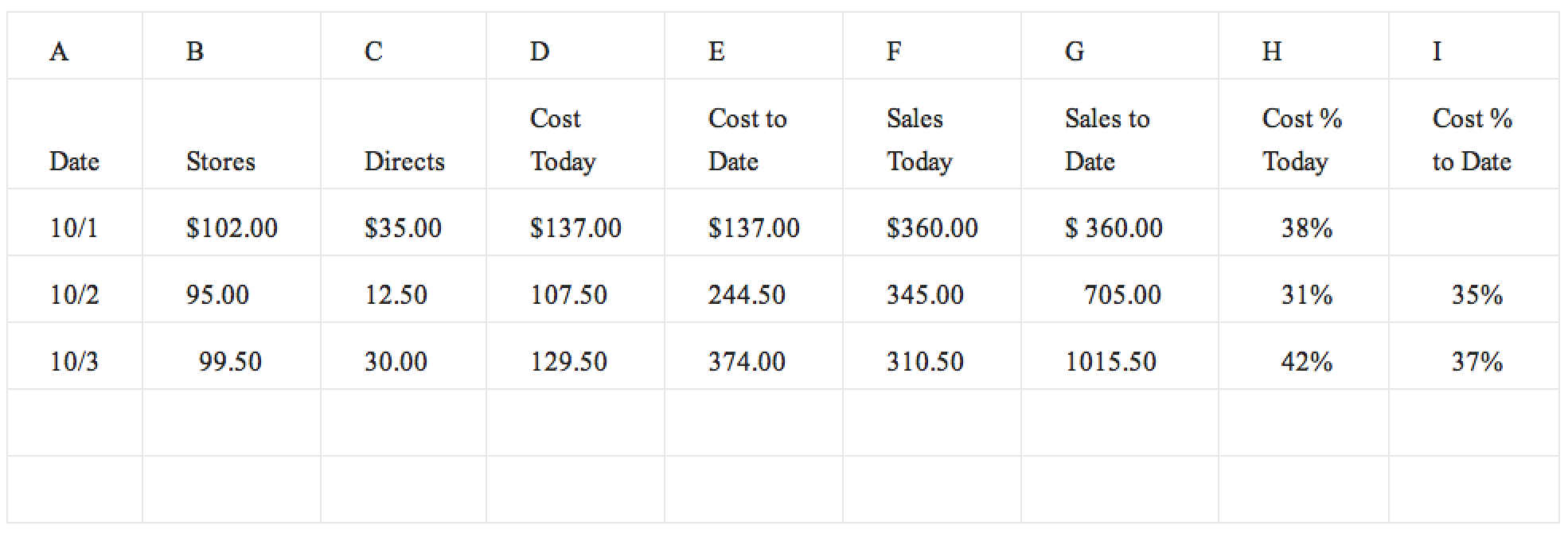
Daily cumulative food cost record
The daily cumulative food cost record will quickly indicate if daily food costs are getting out of hand. A single bad food cost percentage day may not be anything to worry about as supplies charged against that day may not have been entirely used that day. For example, directs might be received only twice a week and so on those days, costs will look high. However, the directs might be used over a period of two or three days. Changes in the pattern of the cost percentages may indicate problems.